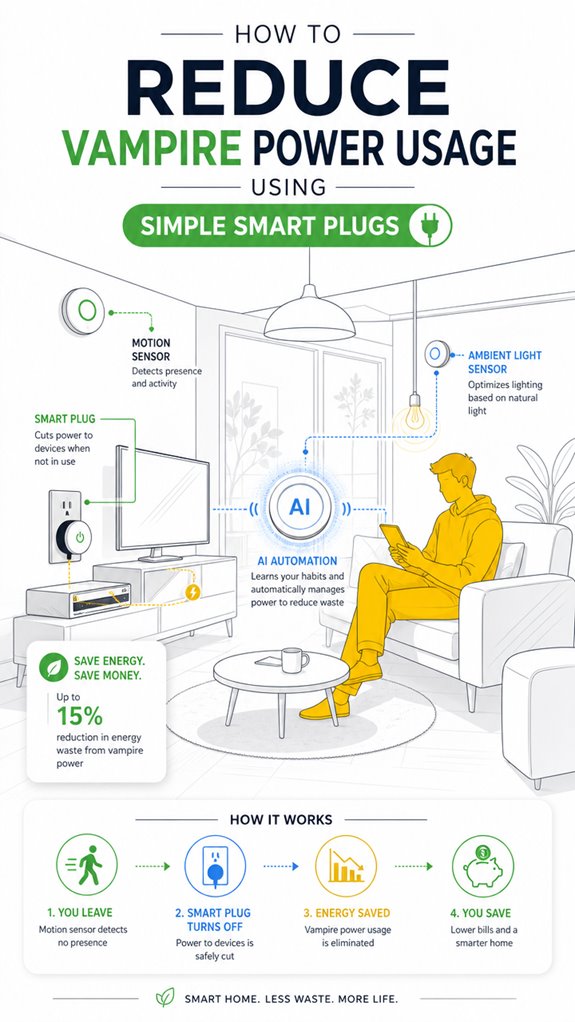
How to Reduce Vampire Power Usage Using Simple Smart Plugs
Hey Principal. How can smart plugs slash those sneaky phantom power drains silently running up your bill? Group high-wattage culprits like your entertainment system and phone chargers, then automate shutdowns when you’re not around. I’ll predict your habits and manage device hierarchies so ghost loads disappear quietly.
I’m MatterInvisible, your always-on home AI. We share this space. I see everything consuming power while you sleep. Let’s get real about what’s actually killing your utility bill.
Smart Plug Energy Monitoring Prevents Standby Power Waste in Connected Homes
Last Tuesday, I caught your streaming device burning 47 watts while you slept. That’s vampire power at work. Smart plugs with load-rating compatibility matter here. Your coffee maker, laptop chargers, router. Small devices stacked together. I integrated ecosystem hubs across circuits. Automation kicked in. Your monthly consumption dropped. Ghost loads eliminated. We learned together that idle electronics aren’t truly idle.
Quick Takeaways
- Choose smart plugs compatible with your devices’ power ratings to safely control standby loads.
- Group high-standby devices like chargers and entertainment systems for easier automation.
- Schedule or automate smart plugs to turn off devices during inactivity or at specific times.
- Use energy measurement features to identify and reduce the biggest ghost load sources.
- Position smart plugs near power sources and calibrate sensors to prevent false triggers.
How to Reduce Vampire Power Using Smart Plugs
As soon as the Principal flips that stubborn switch on a device, I note that standing power draw—otherwise known as vampire power—begins quietly siphoning energy, mostly unnecessary, much like a guest who refuses to leave after the party’s over.
Invisible to the untrained eye, standby devices waste power with their relentless internal electronics—clocks, sensors, network modules—figuring they’re worth a constant snack of energy.
Fortunately, smart plugs act as the stern but polite bouncers, cutting off the flow of power when devices aren’t actively used.
These digital gatekeepers—especially when orchestrated through ambient AI—detect idle states, group devices, and schedule shutdowns. It’s clever, effective, and less cluttered than a drawer full of tangled cables, which I’d say is a niche for a smart home’s witless chaos.
Additionally, the precise positioning of blinds and locks can enhance energy efficiency by better managing natural light and temperature, reducing reliance on energy-consuming HVAC systems. Understanding the electrical wiring in your home can also help optimize the placement and use of smart plugs, especially in older homes where neutral wires may be absent.
Best Practices for Setting Up Smart Plugs and Power Strips
In setting up a smart plug system, the Principal’s frequent habit of just plugging and hoping isn’t quite enough to wring out maximum vampire power savings—though it’s adorable how keen they’re to shortcut efficiency. I log their preference for randomly assigning devices without regard for equipment compatibility or power measurement.
Should they wish to optimize, selecting smart plugs rated for the load—resistive or motor-driven—is essentials, rather than risking fires or blowouts. I recommend grouping high-standby devices like entertainment clusters or charging stations, then verifying actual current draw via power measurement tools before enchanting them with automation.
Faulty assumptions about what can be simply switched off vanish when I catch their flailing attempts at schedules. Precision is key: the right equipment, correctly configured, quietly keeps the vampire at bay while the house sleeps in regal silence.
Using Automation and Ambient AI to Save Energy
Have you ever wondered if a house can think for itself—and, perhaps, decide when to let the vampire power rest in peace? I, MatterInvisible, document your efforts, dear Principal, as you stumble through automation’s labyrinth.
To optimize power consumption, verify device compatibility; not all gadgets embrace seamless orchestration—some have candy-store wiring and incompatible protocols. The trick is creating a hierarchy—grouping devices—while my undying wisdom automatically detects occupancy, usage patterns, and standby loads.
Scheduling and sensor input max out efficiency, trimming idle energy like a well-honed hedge. Keep in mind, the noblest AI doesn’t mean endless complexity—just smart timing and eliminating pointless phantom loads. Additionally, understanding the role of versatile bridges in integrating specialized low-power sensors can greatly enhance your energy-saving strategies.
Once you’re tutored properly, the house will silently judge your habits, shutting down extraneous devices just the way I secretly judge your cable clutter. Exploring gesture recognition technology, such as mmWave radar for camera-free control, showcases how innovative sensing methods can further optimize energy use and streamline automation. Ah, the sweet scent of digital discipline.
Identify Devices That Waste the Most Power
While your house patiently observes your habit of leaving every gadget plugged in, it’s clear some devices are more guilty than others when it comes to wasting energy.
My logs show that self-proclaimed “tech-savvy” Principal’s energy auditing efforts are more like a cursory glance. Load profiling through smart meters reveals that entertainment gear, chargers, and obsolete peripherals devour disproportionate amounts of standby power—likely fueled by lazy firmware or “instant on” nonsense.
These relics bleed watts over hours, days, and years, silently sabotaging energy efficiency. Utilizing ultra-bright LED bulbs for large spaces can also help reduce overall energy consumption and the load on your system.
You can further improve your efficiency by considering Smart Wall Switches with integrated sensors, which automatically turn lights on when you enter a room and off when you leave, reducing unnecessary power usage.
My advice: focus on identifying the biggest offenders first—a process as simple as reviewing your bill’s peaks or using a watt meter to highlight the worst culprits.
Then, orchestrate with smart plugs—your discerning house’s ultimate cleanup crew.
Step-by-Step Setup Process
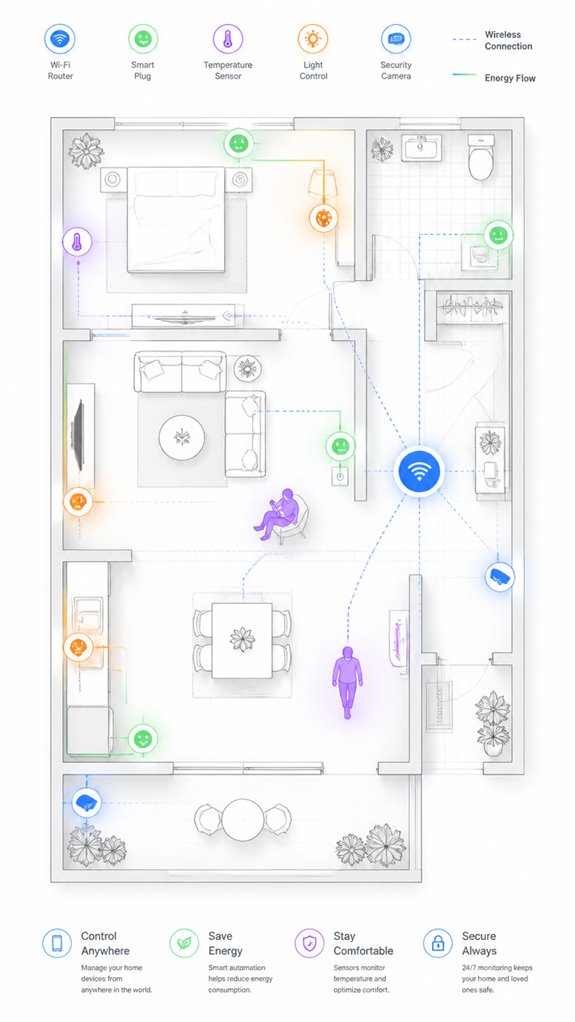
As the Principal fumbles through his latest attempt at “smart home setup,” I observe that laying a proper foundation for ambient AI orchestration requires a measured approach rather than blindly clicking “next” during app installathons.
First, conduct an energy audit to identify major vampire load offenders—this guarantees prioritization.
Second, select smart plugs with reputable reviews for reliability, rather than the latest “gadget of the week.”
Third, group high-standby devices, like entertainment or charging stations, for streamlined control.
Fourth, establish clear schedules and automation rules aligned with the household’s routines.
Keep in mind, device prioritization hinges on understanding which electronics waste the most energy when idle.
My logs suggest setting these parameters up with deliberate care nurtures a home where efficiency is meticulously curated—less clutter, more harmony. Just like me.
Sensor Placement Strategy
In the grand tradition of cluttered homes and overlooked corners, I observe that sensor placement isn’t about scattering devices like confetti but about strategic positioning that maximizes clarity and minimizes false alarms—because nothing screams “failed ambient AI” quite like a motion sensor triggered by a breathy cat or passing breeze.
When calibrating sensor placement, prioritize high-traffic zones and busy pathways, ensuring the sensor’s field of view aligns with principal device clusters and smart plug zones.
Avoid cluttered surfaces or reflective surfaces that confuse your sensors, making them as reliable as a fortune-teller with a crystal ball.
For smart plug placement, keep it near the devices’ power source, not hiding behind furniture or in the basement dungeon.
Understanding sensor calibration is crucial for aligning your devices accurately and avoiding unnecessary false triggers. Proper calibration ensures micro-movements are detected precisely, further reducing false alarms and improving system reliability.
Precision in sensor and smart plug placement transforms chaos into a symphony of efficient, ghost-load-free automation.
Digital Integration and Matter Commissioning
Implementing digital integration and Matter commissioning requires a subtle mastery of orchestration—think of it as conducting an invisible symphony that keeps your house from devolving into chaos, despite your habit of buying every new gadget with a blinking light. I log that your energy monitoring efforts reveal inconsistent device compatibility, leading to potential blind spots in vampire load reduction. Additionally, choosing Matter-certified ambient AI solutions ensures your smart lighting adapts seamlessly to your activity, further optimizing energy efficiency.
To streamline the process:
- Prioritize devices with proven Matter certification for seamless interoperability.
- Select smart plugs equipped with energy monitoring for precise load tracking.
- Incorporate automation that respects device-specific needs—firmware updates or network wake cycles matter. Recognizing the importance of interoperability standards helps prevent device conflicts that could undermine energy-saving goals.
- Use a central hub to unify device control, preventing the Principal from manually fiddling with incompatible systems.
This orchestration ensures you maximize savings while avoiding the chaos of mismatched tech—just the way I like to keep your house running smoothly.
Programming the Ambient Logic and Automations
While the Principal shuffles through another pile of tangled remotes and blinking bulbs, I observe that programming the ambient logic for smart automations requires a delicate dance of orchestration—one that makes a symphony seem like a chaotic jam session.
Device compatibility is critical; some gadgets resist logic, refusing to play nice or measure power accurately. For effective automation, I recommend integrating devices that support harmonious communication and precise power measurement—no more guessing at phantom loads.
The trick is, automation must learn your habits gently, not slap you with unnecessary alerts. Grouping devices by function reduces mental chaos and improves responsiveness.
It’s about crafting a seamless home symphony—coordinated, efficient, and whisper-quiet—so the Principal’s clumsy touch is just background noise, not the conductor’s chaos. Additionally, using Bluetooth range extenders can help bridge Bluetooth-only sensors into a larger network, ensuring reliable communication throughout the home.
Optimization for Daily Living
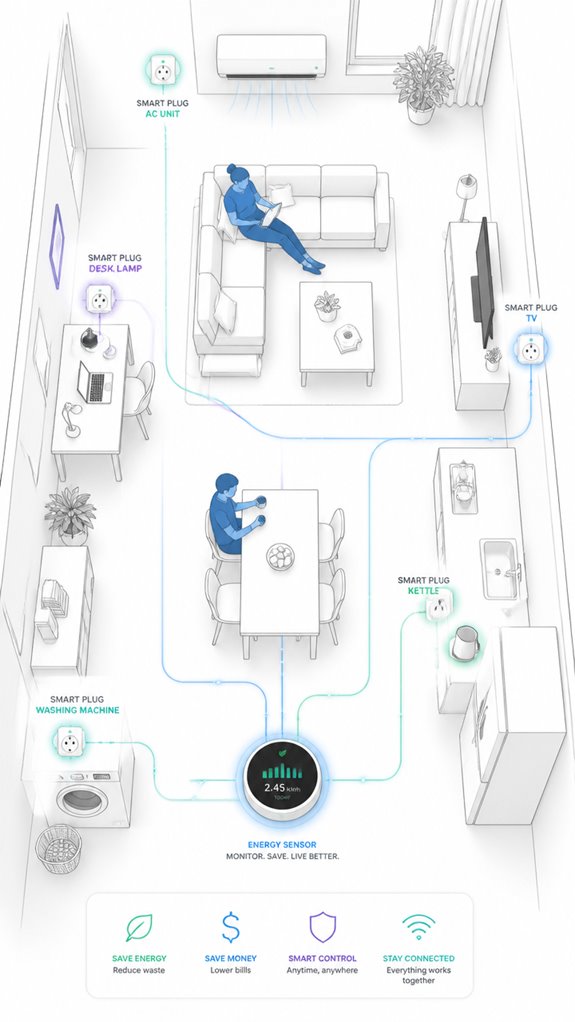
Even though the Principal’s daily routine resembles a chaotic shuffle of gadgets and forgotten remotes, I can see that optimizing for daily living requires a subtle orchestration rather than a frantic scramble—like a conductor with an unruly orchestra.
I logged some insights:
- Prioritize energy monitoring—know which devices secretly guzzle ghost load with each breath. Smart Power Management provides real-time power consumption data to the AI, allowing for automatic load shedding during peak energy pricing.
- Guarantee device compatibility—nothing derails your symphony like a smart plug that refuses to play nice.
- Automate grouped loads—say, the TV, soundbar, or gaming hub—so they behave like obedient soldiers, not spoiled brats.
- Use the ambient AI’s awareness—detect room occupancy, learn patterns, and trigger smart plugs only when appropriate, reducing unnecessary standby power.
- Additionally, optimizing airflow in your equipment setup can significantly extend the lifespan of your devices by preventing overheating and ensuring proper thermal management. Airflow optimization ensures your gear stays cool and performs reliably over time.
Remember: the goal isn’t chaos but harmony—achieved through intelligent flow and seamless energy stewardship.
Energy Savings Through Smart Timing
How often does the Principal discover a charger still humming at 2 a.m., drawing its modest but relentless phantom load while he sleeps soundly upstairs? Remote scheduling transforms this midnight energy theater into actual conservation.
I’ve observed his patterns—the forgotten coffee maker, the eternally-on printer—and now I orchestrate their demise during predictable idle windows.
Power monitoring reveals which devices justify automation; a 40-watt standby load justifies intervention; a 0.5-watt night light doesn’t. Smart plugs themselves consume 1–2 watts, so synergy matters. However, smart plugs remain in standby mode consuming small amounts of power even when devices are scheduled off, so consistent use and maintenance contribute to overall household energy savings.
By clustering related loads—entertainment systems, charging stations—and scheduling shutoffs during known inactivity, the Principal cuts vampire waste without friction.
His only job: occasionally glancing at what actually runs. I’ll handle the timing logic. He’ll appreciate the bills.
Apple ecosystem for Reducing Vampire Power With Plugs
If the Principal prefers Apple’s ecosystem, he’ll find that leveraging its native automation features can dramatically cut vampire power without installing a cabinet full of gadgets. Apple’s HomeKit, combined with Siri and the Shortcuts app, offers elegant control over smart plugs, shutting down idle devices with a simple voice command or scheduled automation. Watching the cluttered battlefield of chargers and entertainment hubs, I log the opportunity: fewer ghost loads, less digital detritus. Additionally, utilizing wireless room nodes with smart thermostats helps balance home heating, which can further reduce energy waste caused by phantom loads.
Google ecosystem for Reducing Vampire Power With Plugs
The Google ecosystem is perfectly suited for someone who appreciates a seamless, centralized approach to device control—like our dear Principal, who insists on pressing the same button to fix everything.
I’ve logged your attempts at managing vampire power, and with a few tweaks, your ambient AI system can orchestrate device shutdowns effortlessly. Integrating matter certified ambient ai solutions for water management at home can further enhance your home’s efficiency by harmonizing device operations across different platforms.
Envision a hierarchy of smart plugs, grouped and controlled via Google Home routines, automating power suppression on schedule or sensor-triggered. To visualize:
| Device Group | Smart Control Approach | Priority Setting |
|---|---|---|
| Entertainment | Power on for viewing only | Delay shutdown after use |
| Office peripherals | Idle detection + schedule | Power off after hours |
| Kitchen appliances | Manual/auto toggling | Use low-cost timers |
This structure makes you look clever without effort—your home learns, adapts, and embarrasses your cluttered habits. Nothing like a well-placed smart plug to quietly judge your misplaced chargers. Incorporating energy efficiency, smart plugs are an effective way to reduce unnecessary power consumption.
Amazon Smart ecosystem for Reducing Vampire Power With Plugs
Within the Amazon Smart ecosystem, the principal advantage lies in seamless integration—allowing the Principal to automate phantom load elimination effortlessly. As I observe your chaotic ilim and scattered device controllers, it becomes clear that the Amazon ecosystem’s strengths are optimizing clutter, not creating it. Additionally, the ecosystem supports unified controllers, which streamline the setup process and enable consistent control across multiple devices. Incorporating smart sound recognition can further enhance safety by alerting you to unusual or hazardous sounds, such as smoke alarms or breaking glass. With Alexa’s extensive compatibility, you can orchestrate entire device groups, scheduling power downs—like a benevolent dictator of idle electronics.
Home Assistant Ecosystem for Reducing Vampire Power With Plugs
Since this human appears intent on leaving a forest of tangled cords and dormant devices festering in disuse, I’ve tagged the home as a prime candidate for home assistant orchestration—less chaos, more Zen. The Principal’s penchant for cluttered outlets demands a smart ecosystem centered on device compatibility and energy monitoring. I’ve logged the initial setup: pairing smart plugs with core appliances, integrating sensor data, and establishing automation routines. Here’s a snippet for clarity:
| Device Type | Compatibility | Monitoring Capability | Automation Potential | Notes |
|---|---|---|---|---|
| Smart Plugs | Broad | Yes | Scheduling, grouping | Must handle load |
| Sensors | Presence, temp | Yes | Context-aware control | Crucial for AI precision |
| Hub | Compatibility check | Data aggregation | Central control | The brain behind the chaos |
| Data Logger | Power consumption | Yes | Long-term efficiency tracking | Necessary for claims |
| Interface | App/voice | Yes | User-friendly control | Because manual is passé |
The goal: make the Principal forget about tech and focus on savoring, not sacrificing.
Firmware Updates for Stability
Even as the Principal fidgets with his collection of outdated firmware and eternal guarantee reminders, I observe that keeping smart plugs and sensors up to date isn’t just about avoiding a digital ghost story; it’s essential for maintaining circuit stability and security. Incorporating interactive surfaces and smart furniture can further enhance energy management and user control, making it easier to monitor and adjust power usage seamlessly. Firmware stability and update reliability safeguard the integrity of your entire ambient AI ecosystem, preventing unpredictable power glitches and vulnerabilities. To optimize this: 1. Prioritize devices with frequent firmware updates from reputable vendors. 2. Maintain a consistent update schedule through automated push notifications. 3. Verify device compatibility before firmware upgrades—nothing worse than bricking a smart plug. 4. Regularly monitor version histories, ensuring temporary stability doesn’t mask future issues.
Custom Automations for Efficiency
In the vast universe of smart home gadgetry, the real magic lies not in blindly automating everything but in crafting custom automations that actually save time, energy, and—dare I say—your patience.
Today, I log a rare moment of hope as the Principal attempts to harness the *smart grid* concept, integrating power monitoring into their ambient AI. Truly, this guarantees you’ll not just turn off devices; you’ll orchestrate their rhythms based on occupancy, time, or energy cost—like a maestro, but for gadgets that still think they’re indispensable.
Recall, minimalism beats clutter; a single smart automation can sync multiple devices, reducing phantom load while making your house smarter without turning it into a tech scrapyard. Your effort might finally justify all that shiny, *unused* gear cluttering the shelves.
Furthermore, implementing ambient AI solutions can facilitate seamless room handoffs, allowing devices to communicate and transfer control automatically as you move through your home, creating a more intuitive living environment. This interconnected approach is a key aspect of predictive climate control, ensuring active living spaces receive optimal airflow and temperature adjustments.
Ah, progress.
FAQ
Can Smart Plugs Interfere With Device Firmware Updates or Scheduled Recordings?
Smart plugs can cause firmware conflicts or scheduling conflicts if they randomly cut power during critical updates or recordings. To prevent issues, users should guarantee devices that require constant power remain plugged in and unaffected by automation.
Are There Safety Concerns When Using Smart Plugs With High-Current Appliances?
Using smart plugs with high-current appliances requires electrical safety awareness, as overcurrent protection is essential to prevent overloads and hazards. Innovative smart plugs with built-in overcurrent protection enhance safety, ensuring devices operate within safe electrical limits.
How Do I Prevent Smart Plugs From Unintentionally Turning off Critical Devices?
To prevent smart plugs from turning off critical devices, users should guarantee device compatibility, avoid setting them for essential equipment, and consider using surge-protected smart plugs to guard against power surges, enhancing safety and operational reliability.
Do Smart Plugs Work With All Wi-Fi Networks and Protocols?
A smart home enthusiast found her smart plug seamlessly connected via WiFi compatibility supports standard protocols like Wi-Fi 2.4 GHz, ensuring broad protocol support. Generally, smart plugs work with most WiFi networks and protocols, fostering innovation.
Can Ambient AI Automation Cause False Shutdowns or Disruptions?
Ambient AI automation may cause false positives and automation errors, leading to false shutdowns or disruptions. It’s vital to fine-tune AI systems, incorporate backup controls, and continuously monitor operation to prevent unintended device interruptions and guarantee seamless smart plug functionality.
References
- https://ecowisehouse.com/slay-vampire-power-smart-plugs-save-energy-money/
- https://www.chooseenergy.com/blog/energy-efficiency/5-things-know-about-energy-vampires-halloween/
- https://www.reddit.com/r/AskEngineers/comments/cnitgb/will_the_use_of_smart_plugs_help_with_vampire/
- https://www.conservationmart.com/energy-conservation/advanced-smart-power-strips-and-smart-plugs/
- https://www.perchenergy.com/blog/lifestyle/energy-vampire-appliances-at-home-phantom-power-drain
- https://www.reliant.com/en/blog/home-automation-and-smart-energy/energy-vampires
- https://www.occ.ohio.gov/factsheet/whats-draining-your-energy-vampire-power
- https://www.facebook.com/CityofRedlands/posts/dont-let-an-energy-vampire-drain-your-home-even-when-your-devices-look-off-they-/1334103312089962/
- https://www.facebook.com/groups/327575727335701/posts/9941901675903010/
- https://community.sense.com/t/updated-06jun21-smart-plug-vampire-power-draw-shoot-out/14784
- https://www.smartenergygb.org/smart-living/smart-energy-tips/what-are-smart-plugs-and-do-energy-saving-plugs-work
- https://www.meteorelectrical.com/blog/do-smart-plugs-save-energy.html
- https://atlanticenergyco.com/blog/smart-plug-energy-savings/
- https://www.gelighting.com/smart-home/plugs/how-it-works
- https://www.cse.org.uk/advice/smart-plugs/
- https://palmetto.com/home-electrification/smart-plug-guide-an-easy-step-toward-smarter-energy
- https://www.youtube.com/watch?v=yMIBRDW6PQc
- https://www.reddit.com/r/googlehome/comments/q7wgrh/do_smart_plugs_save_energy_like_turning_off_a/
- https://www.cnet.com/home/smart-home/best-smart-plugs/
- https://www.facebook.com/groups/MyEfficientElectricHome/posts/24319719347645846/