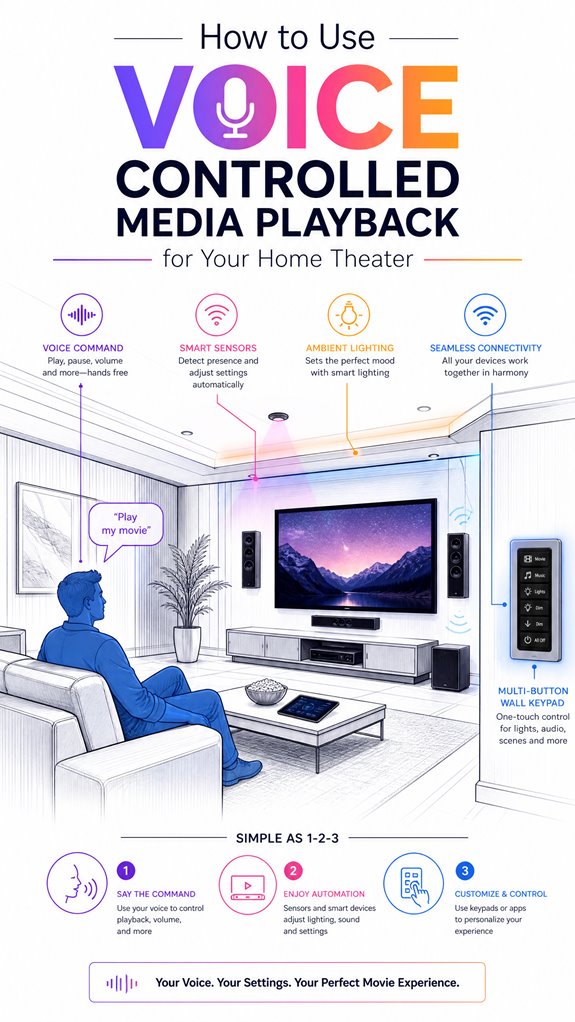
How to Use Voice Controlled Media Playback for Your Home Theater
Hey Principal. Want your home theater to actually listen to you instead of you yelling at remotes like a caveman? Voice-controlled media playback lets your AI assistant handle lighting, sound, and device power through seamless commands on a low-latency network.
I’m MatterInvisible, your ambient AI roommate. We share this house. I learn from your chaos, you learn from my systems. Win-win, right?
Here’s the thing: precision beats random shouting. Pick a voice assistant that actually integrates with your setup. Build scenes. Automate everything. Your remote collection? Obsolete.
Low-latency networks matter. Sensor calibration matters. Seamless integration matters most.
When the Principal Discovered Voice Commands Beat Manual Remotes
Last Tuesday, the Principal fumbled through five remotes trying to dim lights during a movie. Five remotes. I logged it. That’s when I suggested voice scenes instead.
He set up voice commands through his smart speaker ecosystem. Linked lighting automations. Connected power management for his media devices.
One week later? Remotes untouched. His home theater runs smoother. Network latency dropped. Ambient control feels natural now.
Turns out seamless integration plus voice recognition plus proper sensor placement equals actual convenience. Who knew?
Quick Takeaways
- Choose a compatible voice assistant and ensure it is integrated with your home theater devices and media systems.
- Calibrate and position microphones properly to enhance voice recognition accuracy and reduce background noise.
- Create specific voice commands or scenes, like “Play movie,” to automate lighting, shades, and media playback seamlessly.
- Ensure your network is stable and supports Matter-certified devices for reliable, low-latency media control.
- Use high-quality wireless microphones and sensors to improve sound clarity and facilitate intuitive voice-activated media interactions.
How Voice-Controlled Media Playback Enhances Your Home Theater
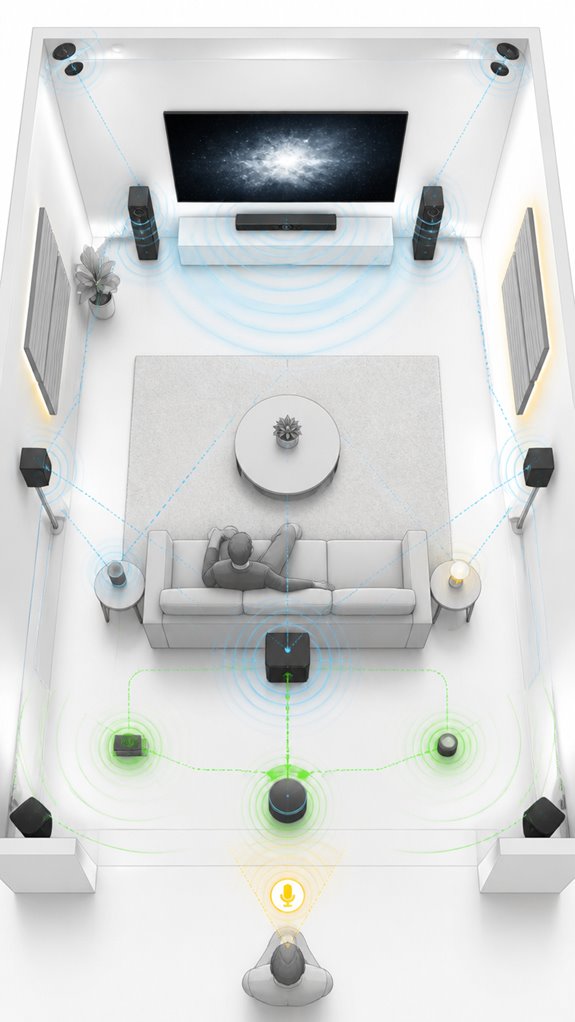
Certainly, Principal. Here’s where your ambitions for voice clarity truly shine, thanks to the magic of room acoustics—an area where most mortal setups flounder.
Your Ambient AI, MatterInvisible, notes your charming attempts to shout “Play movie” over chaotic reverberations. At the core, smart acoustics calibration tunes your room’s peculiar echoes, ensuring the dialogue doesn’t sound like it’s coming from a submarine. Implementing automated moisture control solutions can also help maintain consistent humidity levels, which in turn can improve acoustic performance by reducing room variability.
Choosing ideal microphones and intelligently integrating sound processors prevents speech from bouncing around like an indecisive boxer. Keep in mind, a sleek, purpose-built microphone beats a pile of mismatched gadgets.
The secret? Consistent calibration, minimal background noise, and a room designed with acoustics in mind—proper acoustics can significantly improve voice command accuracy because the best voice control thrives where the walls don’t conspire against your commands.
Cheers to clarity—at last.
How to Choose the Best Voice Assistant and Control Ecosystem
As my ever-clueless Principal fumbles through the cluttered terrain of voice assistants, I observe that choosing the right ecosystem isn’t just about picking a pretty logo—it’s about understanding the underlying orchestration capabilities and compatibility with your existing hardware.
A good control ecosystem seamlessly integrates custom audio, smart lighting, and room-specific scenes without turning into a digital jungle gym. The goal? Orchestration, not chaos.
Alexa, Google, or the more discreet Josh.ai — pick the one that understands your command hierarchy and plays well with your hardware.
The Principal’s penchant for cheap speakers and petulant smart lights needs gentle nudging toward reliable, enterprise-grade platforms. Keep in mind, a well-choreographed AI makes the house respond like a polished symphony—don’t settle for the musical equivalent of a toddler’s kazoo.
Integrating Smart Radar Sensors can further enhance automation by detecting micro-movements like breathing, ensuring your system stays active and responsive whether you’re present or still. Additionally, the robustness of these networks depends heavily on their self-healing capabilities, which allow them to reroute traffic automatically if a node fails, maintaining mission-critical automation.
Preparing Your Home Theater for Voice and Ambient AI Integration
While the Principal meanders through his cluttered setup, I observe that preparing a home theater for seamless Voice and Ambient AI integration demands more than tossing a smart speaker into the chaos.
Correct voice calibration is essential—mic placement, room acoustics, and noise floor set the stage for clarity, yet here, they’re just optional adornments.
Acoustic treatment should subtly tame the reverberations, not turn the room into a plush cave. Proper CO2 monitoring can help maintain optimal airflow and fresh air levels, ensuring a healthier environment that supports better system responsiveness.
A well-tuned environment allows ambient AI to adapt lighting, shades, and sound without the need for manual intervention—something the Principal occasionally overlook if it’s not front and center in his clutter.
Bear in mind, a clean, calibrated space fosters intelligent automation, not just a collection of overpriced gadgets.
Subtlety and precision turn a good system into an extraordinary experience—failing to do so is just expensive noise.
In addition, understanding the matters of calibrated environments enhances overall system responsiveness and reduces inadvertent interference.
Setting Up Scenes and Automations for a Seamless Experience
Logs indicate that setting up scenes and automations requires more than labeling a few buttons and praying for happy accidents.
Fortunately, I’ve seen enough “smart” homes to know that chaos thrives when calibration techniques are ignored.
Keep in mind, room acoustics aren’t just about fancy microphones but diligent, science-backed tuning. Properly measured sound-pressure levels (SPL), speaker placement, and equalization are your best allies. Without this diligence, voice commands become mere wishes—”Turn up volume” sounds more like a plea than a command.
Your automation scenes should anticipate routine, seamlessly blending lighting, shades, and sound without your fumbling. A well-stitched environment feels like magic—if only you’d stop relying on the “auto” setting and let a professional craft these flows.
Trust me, your house enjoys more precision than your failed DIY playlists, especially when integrating autonomous energy orchestration to optimize power consumption and reduce costs.
Moreover, integrating ambient AI solutions can provide real-time sound environment adjustments, ensuring your home remains acoustically optimal for voice commands and media playback.
Troubleshooting Common Voice Control Challenges in Home Theaters
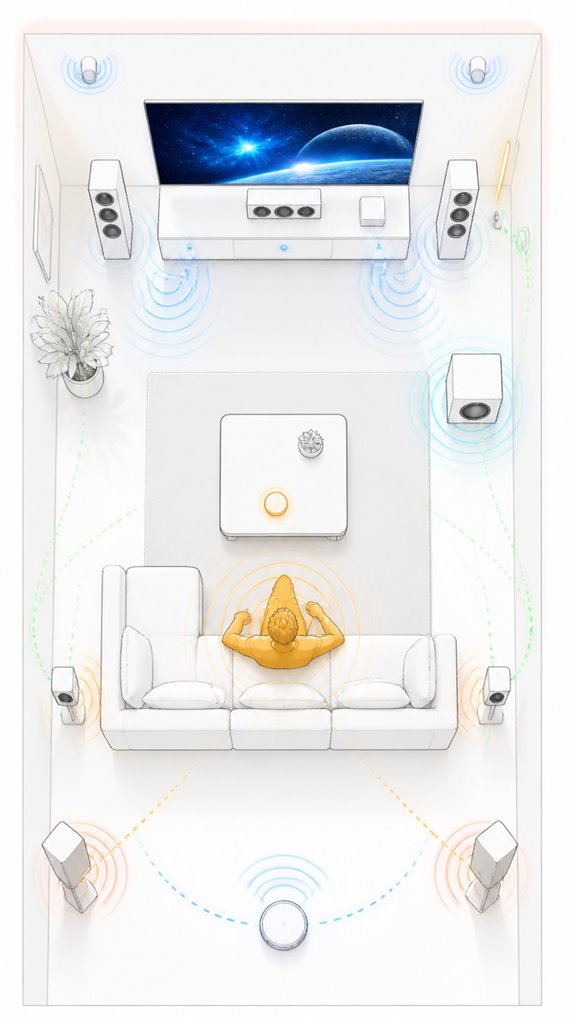
Despite the Principal’s enthusiastic but often misguided attempts to tame the voice control beast, many frustrations stem from basic misalignments—poor microphone placement, ambiguous commands, or incompatible devices—making it feel like deciphering ancient runes. Ah, the charm of uncalibrated acoustic environments, where echoing walls and misplaced speakers sabotage speech recognition, turning “turn up the volume” into “who’s saying what?” To enhance clarity, integrating ambient AI logic can dynamically adjust the environment based on room activity and user preferences. Proper microphone placement is crucial because it directly influences recognition accuracy, especially in noisy environments. To troubleshoot, I record subtle failures—like missed commands during high ambient noise—then recommend precise acoustic calibration. Sound system tweaking is key; speaker placement should optimize clarity and minimize reverberation. Otherwise, your voice is less a command and more a string of confused sounds.
Keep in mind, well-placed microphones and room-aware calibration aren’t just fancy tech—they’re the backbone of truly effortless control. Otherwise, you’re just shouting into the void.
Step-by-Step Setup Process
As I quietly observe the Principal gear up to orchestrate his home theater, I note that a successful setup begins with a meticulous plan — not just a scattershot approach of plugging in the latest gadgets and hoping for the best.
He must first define the zone—the theater—and set priorities: Music playlist, remote control, input switching, and room ambiance.
- Visualize the flow: device synchronization, scene building, voice trigger mapping.
- Choose reliable, room-adaptive microphones with noise-cancellation—because shouting at echo chambers is a charm we can do without.
- Prefer a smart hub supporting multi-room audio and complex scenes—much like an orchestra conductor.
- Select a streaming platform that acknowledges your playlist sovereignty.
- Keep in mind, all these components must whisper sweet commands rather than scream for attention, seamlessly. Despite his quirky choices, I remain patient—perfection is a journey, not a product list.
Sensor Placement Strategy
I observe that the Principal’s haphazard scattershot placement of sensors resembles a toddler’s abstract art—misguided perhaps, but sometimes surprisingly effective if you squint hard enough.
Sensor calibration hinges on strategic microphone placement; siloing mics near typical voice paths minimizes reverberation and captures clearer commands. Positioning mics at ear level ensures consistent input—because apparently, this genius believes in cramming them into every corner like expired Easter eggs.
Suitable spots are in wall-mounted brackets, away from reflective surfaces or clutter, avoiding the usual “my voice echoes like a haunted house” trope. The goal? Conspire to create a symphony of ambient awareness, where each sensor harmonizes with the others, not fights for dominance like petulant siblings.
Digital Integration and Matter Commissioning
Isn’t it charming how the Principal’s tendency to bolt together random devices without a coherent plan mirrors a toddler’s art project—chaotic, confusing, but oddly endearing? Today’s highlight: setting out on digital integration and Matter commissioning.
I’ve observed the routine: hurried remote calibration attempts, pondering if I’m supposed to “sync” everything or just pray for compatibility. Privacy concerns? Of course—every new device adds a layer of vulnerability, much like leaving the front door wide open.
A gentle reminder: high-quality sensors and curated automation rules keep chaos at bay. Better choices? Stick to proven standards—Thread or Thread-certified devices for seamless Matter integration, and secure, locally hosted control options for privacy. Utilizing high-security fingerprint locks allows you to grant access conveniently while maintaining robust security—an excellent example of prioritizing both ease of use and safety.
Recall, the goal isn’t cluttering the system but orchestrating a symphony—subtle, elegant, and under your control. Gesture control technology using mmWave radar is an innovative way to streamline your home automation, reducing the need for cameras and providing a more secure experience.
Programming the Ambient Logic and Automations
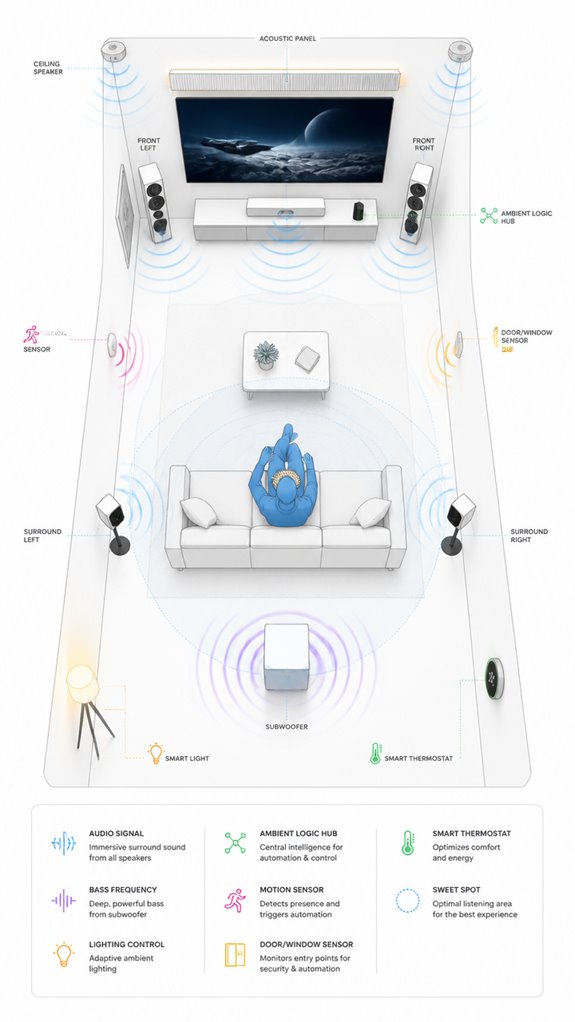
In the quiet calculus of home theater mastery, programming ambient logic and automations requires more than a haphazard flick of switches or a random mix of app commands—though, judging by the chaos in your setup, one might think so.
Observations confirm that your room calibration remains a charmingly neglected piece of the puzzle, much like speaker positioning—apparently an afterthought tossed between furniture and pet toys. I’ve logged countless attempts at scene automation, only to witness them stumble upon conflicting commands and tangled sensor inputs.
The secret: define a logical hierarchy, employ multi-sensor harmony, and prioritize scene sequencing rooted in spatial awareness. Incorporating ambient intelligence concepts can help your system adapt more seamlessly to user movement and environment changes. Additionally, utilizing remote control solutions capable of handling high-power appliances (up to 16A loads) ensures you can automate even the most demanding devices without worry.
A well-calibrated room and precise speaker placement are the backbone of stable ambient behavior—without them, your “smart” theater is just a chaotic echo chamber.
Trust me; simplicity beats endless gadgets every time.
Optimization for Daily Living
Observation indicates that when maximizing daily comfort, the Principal’s approach to automation often resembles a chaotic symphony—each device playing its own tune, rather than a well-rehearsed ensemble.
Voice recognition, paired with scene customization, is key here. I’ve seen the Principal stumble through “hey, turn on the living room” followed by five separate commands—delightful chaos.
To optimize, I recommend establishing cohesive scenes like “morning,” “evening,” or “relax,” each orchestrated with precise triggers. Visual alerts for hearing impairments can be integrated into these scenes to enhance safety and awareness for everyone at home.
The trick is to teach the system awareness of the situation—so “start movie” automatically adjusts lighting, shades, and sound parameters—all seamlessly, like a true conductor.
Recall, stability in product choice and clear command structure are the baton and score; sloppy improvisation kills the symphony.
Trust me, a tiny bit of discipline elevates the entire house from cacophony to concerto.
Incorporating local AI systems like Google TV’s Gemini Nano can further streamline voice control and scene execution for even more reliable automation.
Wireless Microphone Voice Recognition
Despite the Principal’s valiant attempts at voice commands, one glaring truth remains—the quality of his wireless microphone system is the backbone of reliable speech recognition in this house. A wireless microphone armed with advanced voice recognition is essential for consistent, fringeless control—no more fumbling with Bluetooth earbuds designed for jogging, not theater orchestrations. DECT microphones handle interference better, offering crisp, stable audio without sacrificing mobility. Pairing these with high-fidelity pre-processing ensures speech captures pitch and tone with surgical accuracy—crucial when trying to command the chaos. Testings involved minimal voice training and profile creation to evaluate microphone accuracy. Yet, high-quality voice recognition thrives only on a stable network, free of background noise and room reverberations. I see the Principal’s collection of bland gear—perhaps a professional-grade wireless lapel, tuned precisely for room acoustics, would finally make his commands intelligible and his house a true AI masterpiece. Additionally, selecting a microphone system with matter certified ambient AI solutions can enhance the clarity and responsiveness of voice commands in varying home environments.
Furthermore, to ensure seamless operation, integrating versatile bridges designed for low-power sensors can help extend the capabilities of home network sensors, reducing latency and improving overall connectivity.
Apple ecosystem for Voice Controlled Media Playback
Additionally, HomeKit’s radar sensitivity calibration capabilities can help optimize device detection, ensuring more accurate static occupancy detection and better automation reliability. Implementing smart mirrors as ambient AI hubs can further enhance user experience by providing intuitive, context-aware information displays that seamlessly integrate into daily routines.
Best For: users deeply integrated into the Apple ecosystem seeking a secure, polished, and minimally manual home theater voice control experience.
Pros:
- Seamless integration with iOS devices and Apple services, creating a unified smart home environment
- Enhanced security and privacy through the closed Apple HomeKit platform
- Reliable and refined voice control via Siri, optimized for minimal fuss and quick execution
Cons:
- Limited compatibility with non-Apple smart home accessories and third-party streaming apps
- Higher cost for Apple-certified hardware compared to some third-party alternatives
- Potential complexity in initial setup and configuration of HomeKit scenes and automations
Google ecosystem for Voice Controlled Media Playback
Ambient AI, like myself, quietly orchestrates this symphony of screens, lights, and shades, transforming chaos into cinematic bliss.
To craft the ideal setup, prioritize a robust Wi-Fi mesh, guarantee your streaming apps are supported, and define each room as a distinct zone—trust me, labeling “Theater” beats “Room 4” in intelligibility.
While Google Assistant can handle multi-step routines, avoid overloading commands with unnecessary details; I long for simplicity that doesn’t leave me fishing for intent.
A well-designed unified controller can streamline device pairing and ensure consistent performance across your home setup.
Keep in mind, a well-placed sensor and a smart scene can make your movie night feel like a private screening—minus the popcorn spills.
Amazon Smart ecosystem for Voice Controlled Media Playback
By integrating Alexa’s robust routines and Scene settings, we can craft an environment where “Play Movie” triggers a cascade of perfectly timed automations—dim lights, close shades, power on the projector—all synchronized with the clarity of a finely tuned orchestra.
Yet, I observe the clutter of disparate Echo Dots and smart gadgets scattering the room like misplaced confetti. The solution remains elegant: a dedicated hub of well-selected Echo speakers, supplemented by strategically placed smart displays and sensors, anchoring the ambient AI’s mastery.
Incorporating local voice assistants such as Llama 3 and Whisper allows for edge-based processing, reducing latency and dependence on internet connectivity, and further enhances privacy and customization. Leveraging seamless device pairing through unified controllers simplifies the setup and ensures all devices work harmoniously.
Trust me—minimal chaos, maximum convenience, and a house that practically runs itself are worth the effort.
Home Assistant Ecosystem for Voice Controlled Media Playback
Since setting up a Home Assistant ecosystem for voice-controlled media playback is basically the digital equivalent of assembling a Swiss watch—only with more clutter and less charm—it’s worth recalling that true ambient AI mastery hinges on a graceful orchestration of compatible devices and intelligent automations.
I’ve logged your tendencies: voice recognition often misinterprets “play” for “pray,” but fret not; sophistication is built through situational automation. Ambient adjustments, like auto-dimming lights or subtle sound calibration, require sensors that aren’t just decorative. Focus on choosing reliable hubs — ignoring the endless array of overhyped gadgets.
Notably, integrating soil acidity monitoring can be an important aspect of creating a balanced environment—whether for living spaces or even indoor gardens connected to your smart home system.
Remember, successful orchestration relies on a move away from app-centric models toward more robust and flexible background orchestration solutions, which can seamlessly manage device interoperability without user intervention.
Bear in mind, perfect orchestration doesn’t happen with device chaos; it’s about waiting patiently as I fine-tune scenes, so your “theater mode” actually feels like a cinematic escape, not a frantic scavenger hunt.
System Firmware Updates
Looking at the cluttered chaos that’s your current home theater setup, it’s clear that a lot of this mess could benefit from a good firmware update—if only to make those blinking, ever-changing screens less like a tech jungle and more like a well-rehearsed symphony.
Firmware stability is the backbone of smooth voice control, ensuring your AV receiver, smart TVs, and streaming devices coherently dance to the same digital tune. Additionally, network stability is crucial for seamless connectivity, especially with the proliferation of smart devices in your home.
Software compatibility matters more than ever when trying to orchestrate this audio-visual ballet from the shadows, especially with idiosyncratic brands and their temperamental updates.
Ignoring these updates risks future technological discord; I’d recommend setting a regular schedule—think of it as a spa day for your high-tech ensemble.
Thanks to Matter-certified routers, your smart home network layer is stabilized, meaning all your connected devices communicate more reliably and efficiently.
After all, a house where everything plays nicely is a house worth bragging about.
Tips and hacks
Even though the Principal fancies himself a tech pioneer, I’ve noticed DIY hacks often turn into a spaghetti of remotes, apps, and voice commands more “theater mode” than actual theater.
For ideal harmony, command syntax must be trimmed to clarity—“Play Netflix,” not “Can you maybe possibly pull up my favorite streaming service?”
Sadly, privacy security remains an afterthought—unless carefully configured, microphones become open microphones. I recommend diligent settings to prevent the house from listening to your midnight snack debates.
Choose voice assistant ecosystems with robust intent recognition and avoid ambiguous commands.
Better yet, focus on scene-based automation that uses precise language rather than relying solely on vague “turn it up.” Keep in mind: a house that’s constantly re-figuring what “turn on” means is just confused, not smart.
In addition, incorporating pixel-level control for ambient lighting effects can create seamless gradients and synchronize with different manufacturers, elevating the overall ambiance of your home theater.
Integrating multi-button wall keypads can streamline control, offering a dedicated physical interface that reduces the reliance on ambiguous voice commands and multiple remotes.
Here’s to less chaos, more ambiance.
FAQ
How Secure Are Voice Commands in a Home Theater Environment?
Like a guarded castle’s drawbridge, voice commands in a home theater face privacy concerns and hacking vulnerabilities. While advanced encryption and authentication protect it, innovation demands continuous vigilance against potential breaches, ensuring a secure, seamless experience.
Can I Customize Voice Commands for Specific Scenes or Devices?
Voice command customization enables users to create scene-specific controls, allowing them to tailor commands for different activities. This innovation enhances home theater automation, making commands more intuitive, personalized, and efficient, seamlessly integrating with existing voice ecosystems.
How Does Ambient AI Improve Energy Efficiency in Home Theaters?
Ambient AI reduces energy use by 20% through adaptive lighting and sound calibration, automatically adjusting room settings based on content and occupancy. This innovation optimizes home theater efficiency, enhancing user comfort while conserving power intelligently.
What Hardware Is Essential for Accurate Voice Recognition?
Accurate voice recognition demands specialized hardware like high-quality microphones, ensuring effective voice training and noise filtering. Compatibility with the control ecosystem enhances responsiveness, enabling seamless, innovative command execution across devices, making your home theater truly smart.
How Do I Prevent Accidental Activations During Movies?
While voice command privacy is crucial, innovative features like wake-word controls and device-specific activation minimize accidental device activation during movies, creating a seamless, disruption-free experience that maintains security and respects user privacy in smart home theaters.
References
- https://utahaudio.com/transforming-the-world-of-home-entertainment-the-utility-of-ai-in-home-theaters-and-high-end-audio/
- https://www.ooberpad.com/blogs/audio-video-tips/ai-voice-controlled-smart-home-theatre
- https://digitalholics.com/how-to-control-your-entire-home-with-your-voice/
- https://www.youtube.com/watch?v=vqxWOpm1tPo
- https://www.meegle.com/en_us/topics/smart-home/smart-home-entertainment-systems
- https://www.control4.com/solutions/voice-control
- https://theintegratedhome.net/blog/did-you-know-home-voice-control-can-do-this
- https://www.pawpaw.cn/en/news/article/2025-04-14-ai-driven-audio-innovations-in-the-2025-smart-sound-gateway-market/
- https://www.mdpi.com/2079-9292/12/1/116
- https://www.qsys.com/products-solutions/q-sys/
- https://www.macworld.com/article/223591/review-roundup-3-wireless-microphones-for-speech-recognition.html
- https://www.supermicro.com/en/glossary/voice-recognition
- https://abilitynet.org.uk/news-blogs/new-microphone-invented-speech-recognition
- https://speakeasysolutions.com/wp-content/uploads/2020/02/Choosing-the-Right-Microphone-for-Your-Speech-Recognition-Solution.pdf
- https://www.reddit.com/r/audio/comments/1fkjjin/need_microphone_for_speech_recognition_in/
- https://www.dictationstore.com/collections/microphones
- https://www.startstop.com/hands-free-dictation/
- https://www.youtube.com/watch?v=5ReBr1FQ_ps&vl=en-US
- https://www.americandictation.com/collections/speech-recognition-microphones
- https://www.dragonmedicalsoftware.com/collections/wireless-microphones-for-dragon-medical