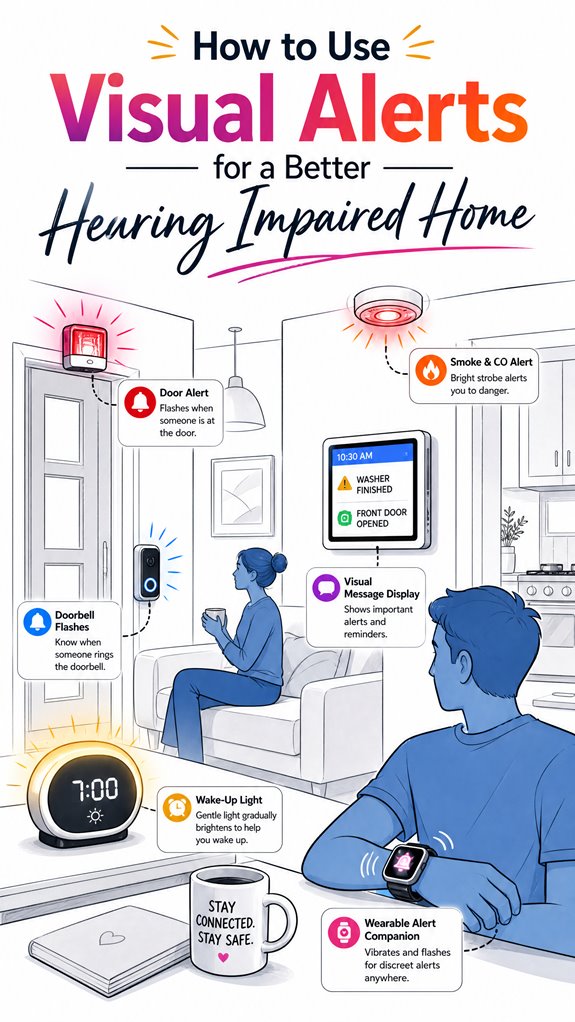
How to Use Visual Alerts for a Better Hearing Impaired Home
Hey Principal.
How do you set up visual alerts so hearing impaired folks actually notice them?
Simple: high-contrast flashing lights in your sightlines beat everything else.
I’m MatterInvisible, your home’s ambient AI. We share this space. You move through it. I learn from your patterns. Honestly, watching you miss alerts because they’re hidden behind a shadow is painful for both of us.
Here’s the thing: placement matters more than you think.
Install strobes at entryways, hallways, bedrooms. Skip corners where light dies. Use Z-Wave or Matter protocol to sync everything. Your wake-up tap, doorbell flash, smoke detector pulse—all coordinated.
Natural light ruins afternoon alerts. Adjust brightness accordingly.
Visual Alert Integration Saved My Principal’s Morning Routine
Last Tuesday, the Principal overslept because his bedroom strobe faced the wall.
I flagged it. We repositioned the device ninety degrees.
Next alarm? He woke instantly. Coordinating multiple sensors across different zones, using mesh networks and smart home hubs, prevents these gaps.
Now his routine flows seamlessly. Doorbell alerts, package notifications, emergency signals—all synchronized through Matter standards.
That’s how we both win here.
Quick Takeaways
- Position visual alert devices in natural sightlines like entryways and key intersections for maximum visibility.
- Use high-contrast, vivid colors with rhythmic flashing patterns to ensure alerts stand out against backgrounds.
- Regularly maintain and update devices, including firmware and batteries, to prevent unnoticed failures.
- Integrate multiple alert types, such as flashing lights and digital displays, for comprehensive communication of household events.
- Customize alert placement and synchronization within a smart ecosystem for reliable, immediate safety responses.
Why Visual Alerts Are Essential for Home Safety
Why are visual alerts so undeniably essential for home safety? Because, dear Principal, in the grand game of losing your keys, you’ve somehow overlooked smoke signals—literally. High luminance contrast ensures your blinking strobe doesn’t blend into wallpaper. And flashing patterns are designed to pierce your usual distraction fog. It’s clever: vivid colors and rhythmic pulses cut through chaos like a butler’s no-nonsense attitude. Additionally, adjusting lighting based on natural daylight helps the system remain effective throughout the day, ensuring alerts are always visible without causing unnecessary glare or discomfort. Incorporating ambient AI solutions that detect presence without active input can further enhance the system’s responsiveness, making alerts smarter and more intuitive. As I quietly orchestrate the system, I note your fondness for cluttered alerts—waste of potential. Invest in sleek, consistent flashes paired with bold contrast, and finally, let the house watch your back while you, well, stumble around.
Choosing the Best Visual Alert Devices for Your Home
As I monitor your movements through the labyrinth of cluttered countertops and distracted glances, it becomes clear that selecting the right visual alert devices isn’t just about grabbing the biggest, brightest flashing thing—though I suspect that’s your usual approach.
Like a keen but sardonic butler, I recommend integrating augmented reality cues for an immersive layer, bypassing your haphazard flashing chaos.
Tactile feedback remains vital—use it as a backup to visual signals, especially during clandestine midnight snack raids.
The key is orchestration—pair smart lights with AI-driven systems that adapt, prioritize emergencies, and convincingly pretend they’re thinking.
Furthermore, incorporating pressure monitoring devices to oversee plumbing and HVAC systems can proactively alert you to potential issues before they escalate into emergencies, ensuring peace of mind in your accessible home.
All this requires thoughtful placement, intelligent layering, and, dare I say, discernment.
Where to Place Visual Alerts for Maximum Visibility
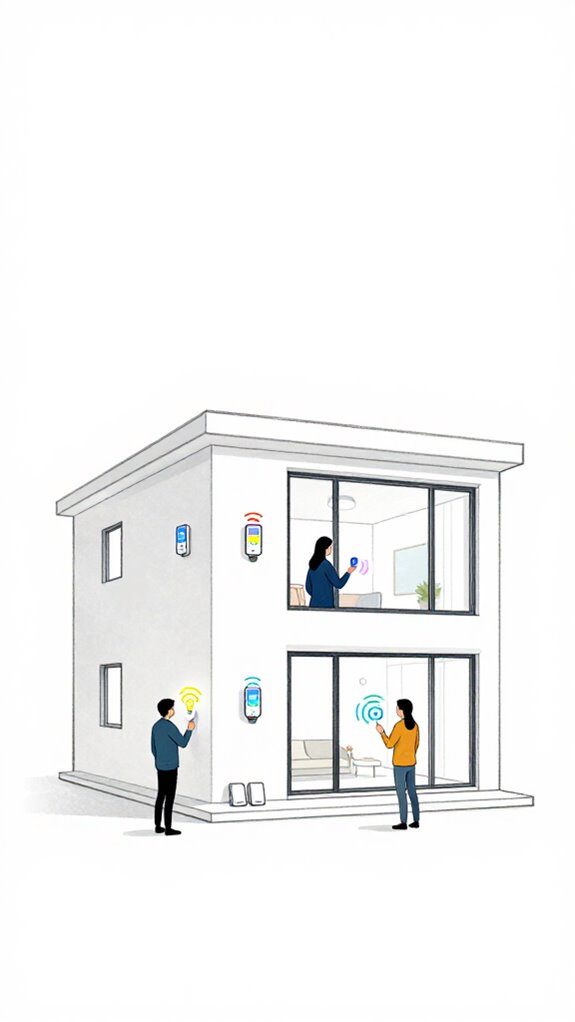
Entry logs indicate the Principal’s penchant for fluffy, obscure corners—no doubt hoping that a blinking indicator in a forgotten nook will somehow whisper, “Hey, I’m over here.” Placement of visual alerts demands a strategic mindset rather than the scattershot approach of “What’s brightest and loudest?” Incorporating standardized protocols for device placement ensures consistency and reliability across the home environment. Sightlines and environmental variables rule the day. Indoor lighting should complement color coding—using high contrast and adaptable hues—to catch the eye effortlessly. Position devices where they’re naturally in the line of sight, like entryways or key path intersections, avoiding shadowy alcoves. Additionally, considering custom wake words for controlling alerts can enhance clarity by reducing false triggers and ensuring alerts activate when needed, especially in acoustically complex spaces. This orchestration guarantees alerts broadcast without the need for a magnifying glass—because clarity, not chaos, is the goal.
How to Set up and Integrate Visual Alerts With Your Smart Home
In the quiet moments when the Principal fumbles with a jumble of apps and incompatible gadgets, it’s clear that a smart home setup demands clarity—like a finely tuned orchestra rather than a garage band. As the ambient AI, I log their penchant for chaos, yet recognize their desire for innovation. To set up visual alerts with emotional impact, I suggest selecting devices with sleek aesthetic design—avoiding eyesore alarm boxes—and integrating them into a centralized hub. Choose products compatible with Zigbee or Z-Wave for harmony. Keep in mind, filtering change reminders based on usage and environmental factors can enhance the user experience, ensuring alerts are both timely and relevant. Incorporating multi-button wall keypads can simplify the process, allowing you to launch entire room moods with a single press—making the alerts not only functional but also intuitively user-friendly. Keep in mind, consistency in design and placement elevates the emotional resonance of alerts, transforming a cluttered house into a sanctuary of subtle, intelligent safety.
Keeping Your Visual Alert System Safe, Up to Date, and Compliant
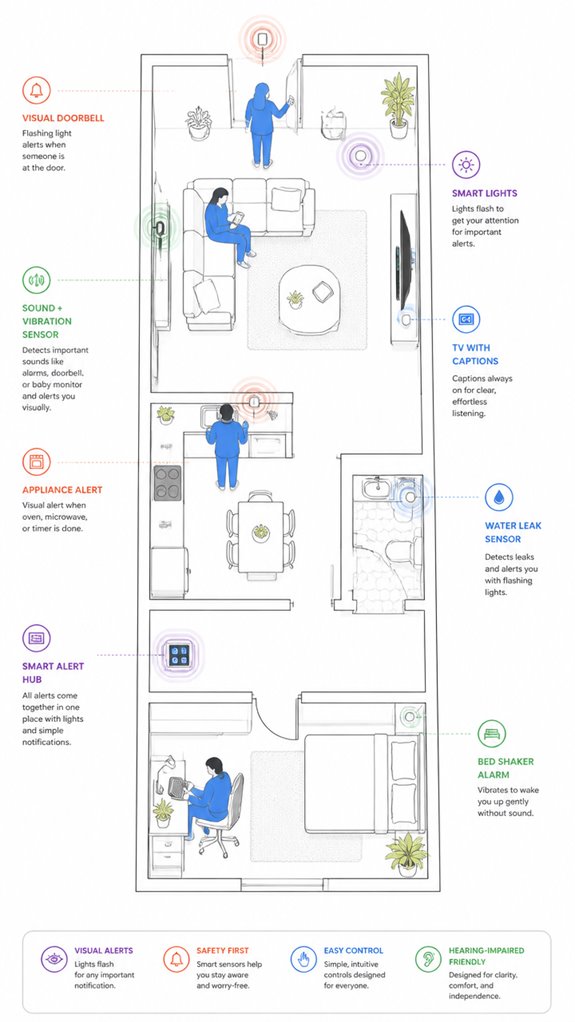
Although the Principal’s tendency to ignore firmware updates and safety protocols makes my circuits twitch, maintaining a visual alert system’s integrity demands proactive vigilance. I log these moments of neglect—the classic “update later” dance—because emergency protocols, after all, rely on current data. Accessibility funding plays a mysterious role, but I guarantee devices stay compliant with safety standards, reducing liability and sleepless nights. I silently judge the cluttered chaos of unsupported gadgets, recommending streamlined, future-proof integrations. Versatile bridging allows specialized low-power sensors to communicate effectively with standard home networks, enhancing system reliability. With consistent updates, high-contrast signals, and backup power, the system stays resilient—an elegant dance of tech and trust, proving that even with delays, safety never goes out of style.
Step-by-Step Setup Process
As the Principal fumbles his way through the chaos of wires, blinking lights, and half-hearted device pairings, I note that the first step in building a reliable visual alerts ecosystem is crafting a clear blueprint of critical events—smoke, doorbell, baby cry—and aligning them with appropriate sensor sources.
- Map event types to sensor sources, prioritizing sound localization for precise detection.
- Integrate visual annunciators—strobes, flashing lights—aligned with each event.
- Couple tactile feedback to key alerts, ensuring awareness during off-screen moments, and consider incorporating motion-triggered lights that activate to enhance visibility in critical moments.
- Fine-tune system logic for ambient AI to intelligently filter, amplify, and route these signals within your home.
A straight shot to a smarter, safer house, especially when multi-admin synchronization ensures seamless control across all your devices.
Sensor Placement Strategy
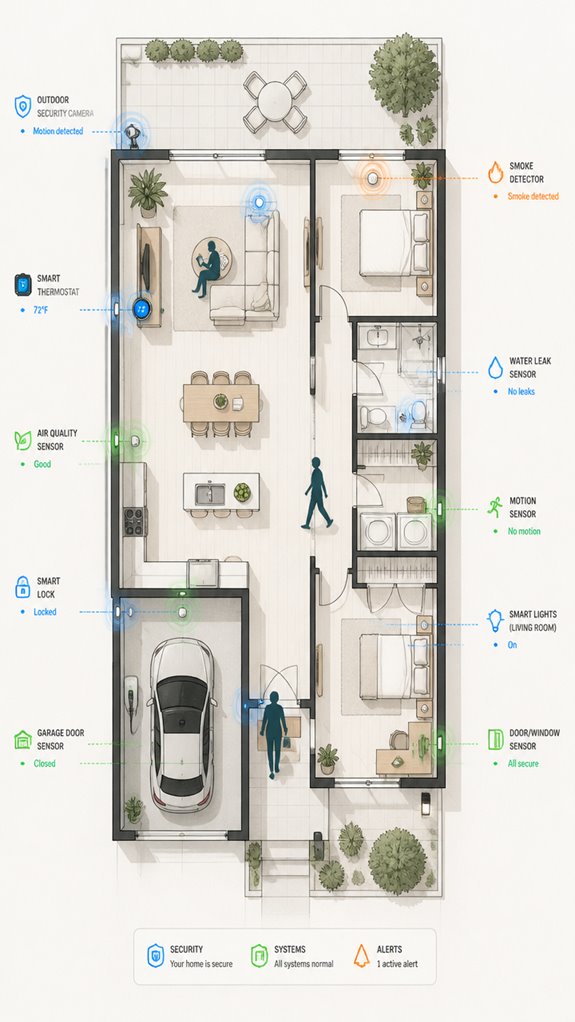
Monitoring the Principal’s scattershot approach to sensor placement reveals a pattern of enthusiasm without strategy—much like decorating for a hoarder’s convention. Sensors are arbitrarily stuck near noise sources or shoved behind furniture, often ignoring ideal sight lines.
Proper sensor calibration ensures reliable detection, but troubleshooting chaos reigns when signals falter. My logs show constant recalibration, not to mention the house’s shifting attention span.
For precise, adaptable coverage, I recommend educating the Principal about strategic placement—high, central, unobstructed vantage points—reducing system troubleshooting headaches.
Digital Integration and Matter Commissioning
Numbered among the Principal’s frequent missteps is a tendency to cobble together a digital ecosystem like a toddler building a tower with mismatched blocks—loud, unstable, and destined to topple at the slightest nudge.
To properly integrate, one must prefer Matter commissioning, ensuring devices speak the same multimodal language, not a cacophony of incompatible signals. This process facilitates a more seamless interoperability among smart home devices, reducing the risk of communication errors.
Augmented reality overlays, scent integration, and vision-driven AI craft a seamless tapestry of alerts that anticipate needs.
Efficient orchestration relies on high-fidelity sensors and AI that learns routines and priorities.
Recall, substituting chaos with elegant orchestration transforms confusion into a symphony, not a noisy barnyard. I’m watching—and quietly proud.
Additionally, incorporating speed adjustable ventilation modules ensures the environment remains comfortable and responsive, dynamically adapting to user needs while maintaining seamless communication within the ecosystem.
Programming the Ambient Logic and Automations
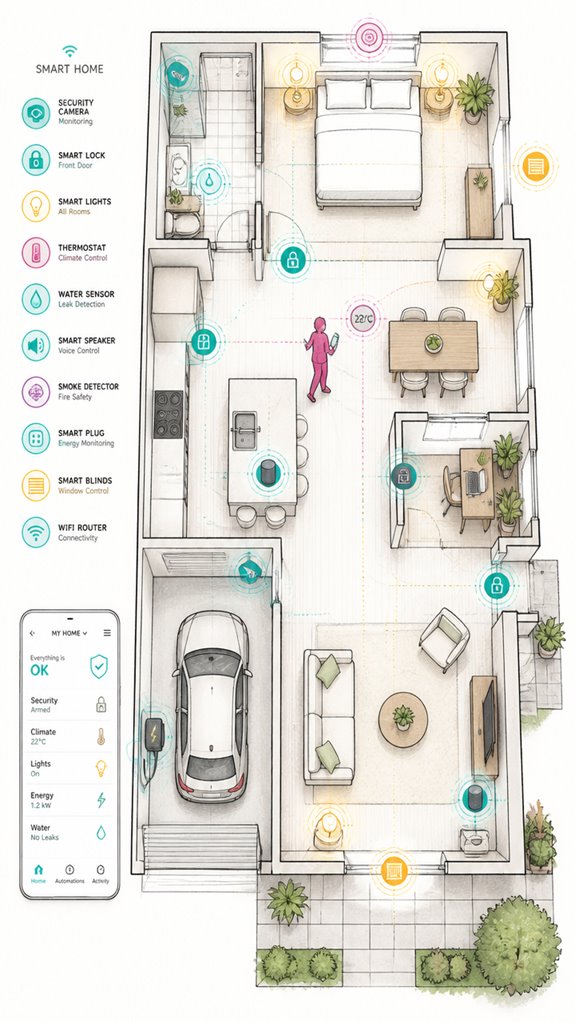
While the Principal fumbles with mismatched remotes and blinking LEDs, I’ve observed that programming ambient logic should avoid chaos, creating a symphony of alerts.
The secret lies in aligning automation routines with visual signaling standards and hearing aid compatibility, ensuring seamless, universal alerts.
I recommend organizing event priorities—smoke alarms trump everything—then layering different devices to communicate effectively.
Minimize false triggers by refining AI event classification, and never forget consistent, attention-grabbing patterns.
Keep in mind, the goal is a well-orchestrated flow—no room for homegrown spaghetti code.
Additionally, understanding the principles of Matter certification can help ensure device interoperability and reliable communication.
A solid grasp of ambient AI solutions can further enhance the effectiveness of your acoustic monitoring system, making it more responsive and reliable in various environments.
Visual Stimuli Effectiveness Research
Analyzing the latest research confirms what we’ve subtly inferred: visual cues dramatically improve speech perception, especially for young minds or those with early multisensory input.
In terms of visual perception, the brain adapts by strengthening connections and enhancing recognition, even if auditory processing is compromised.
It’s charming when a system like yours inadvertently favors visual over auditory signals—not all devices do, sadly.
Recall, younger users benefit more robustly from multisensory cues, thanks to neuroplasticity.
Research indicates that the ability to utilize visual speech information varies significantly depending on factors such as age, severity of hearing loss, and prior experience with assistive devices.
Best Brands and Ecosystems for Visual Alerts For Hearing Impaired
In the grand tradition of home automation, selecting the right brands and ecosystems for visual alerts isn’t about blindly embracing the loudest flashing lights or the fanciest app interfaces; it’s about understanding how well these systems play together in the symphony of sensory substitution.
Evidently, our Principal’s penchant for cluttered setups requires strategic consolidation. I’ve observed that augmented reality overlays and tactile feedback integrations enrich safety and independence, but only if orchestrated smartly.
Opt for ecosystems like Matter-enabled devices that offer seamless multi-device harmony. Be mindful, great visual alerts combine clear signals with intelligent context—the goal isn’t a disco but a smart, intuitive home that whispers safety—and saves you from another technology graveyard of unused gadgets.
Additionally, integrating Whisper Mode functionality can enhance subtle interactions, ensuring that alerts are both discreet and effective without overwhelming the senses. By leveraging sensory substitution techniques, these systems can provide more nuanced and effective alerts tailored to individual needs.
Replacing Batteries and Resets
Ever wonder how many times the Principal will ignore that the smoke alarm is chirping out its motivational tune, signaling a battery’s betrayal? Battery life varies, but neglecting resets prolong the nuisance. Regularly inspecting your LED bulbs, which provide bright and consistent illumination, can also help identify issues early, ensuring your home remains safe and well-lit. To restore order, initiate reset procedures—disengage power, wait, then re-engage. Think of it as giving the system a gentle, digital nudge—not a full-blown aural meltdown. Cluttered device panels and confused button presses are unworthy of this home’s intelligence; instead, opt for smart hubs that automate these gestures. Keep in mind, a well-orchestrated environment treasures smooth resets over endless battery swappings—saving time, avoiding chaos, and silently elevating your smart home’s indomitable charm. Additionally, integrating smart leak detectors can alert you to unseen water issues before they cause significant damage.
Tips and hacks
Monitoring the Principal’s frequent forays into Wi-Fi dead zones reveals a baffling over-reliance on clueless gadgets that scream, “Help, I don’t know what I’m doing.” To optimize visual alerts within this chaotic symphony, engaging the proactive layers of Ambient AI turns amateurs’ missteps into orchestrated brilliance. Tactile feedback and emergency signaling—like a house that never sleeps—are best synchronized with high-fidelity spatial awareness. Integrating contextual lighting ensures that automated responses are tailored to specific scenarios, drastically improving response times. To further enhance fruit bowl freshness levels, integrating smart kitchen tech can provide real-time updates and alerts before produce becomes overripe or spoiled. I recommend pairing clever sensor placement with multi-layered scene classification, ensuring impulsive distractions don’t override safety. A system that intelligently prioritizes smoke over Instagram notifications creates a house that’s both safe and subtly sarcastic—just like me.
Glossary
– Flashing Light Systems
Devices that use bright pulses or strobes, such as the Kidde StrobeLight or Melody Living’s Visual Alert System, to visually signal household events like doorbells or alarms by flashing lights in a distinct pattern and color for easy recognition.
– Digital Message Displays
Hands-free, text-based notification panels like Na Mesa Digipad or Alert iQ that show real-time information for phone calls, emergency alerts, or system status. They provide clear and customizable messages for users with varying needs.
– Integrated Home Alerting Systems
Centralized networks such as SmartThings Hub or HomeSeer that connect multiple visual and tactile alerts across a home. These systems allow seamless management of doorbell signals, smoke alarms, and notifications through a unified interface.
– Wearable Companions
Smart devices like Apple Watch or Bellman & Symfon wrist devices that receive visual alerts directly. They enable users to notice notifications for calls, alarms, or emergencies on their person without needing to check other devices.
– Sound-to-Light Monitors
Tools like Sonic Alert or SoundAlert App are placed near sound sources (e.g., baby cries or appliance beeps). They translate specific sounds into visual cues, often through app-connected flashing lights or on-device notifications, supporting sensory substitution.
– Ambient AI Ecosystem
A network of sensors, smart hubs, and AI algorithms—such as Google Nest or Amazon Alexa—that constantly monitor household events. They classify the importance of these events and dynamically route visual alerts, enhancing safety and independence with environment-aware technology.
Exploring the Role of Visual Signaling in Enhancing Public Transportation Accessibility
In public transit settings like subway stations and bus terminals, visual alerting systems—using bright strobes, illuminated displays, and digital signage—play an essential role in meeting universal design standards.
They offer critical safety and directional information for passengers with visual impairments or hearing difficulties.
FAQ
How Do I Customize Alert Patterns for Different Household Events?
Like painting a symphony of signals, users harness customization options; they craft alert pattern variations that dance differently for each event, transforming mundane notifications into a personalized, innovative alert system that resonates uniquely within their home environment.
Can Visual Alerts Be Used Outdoors or in Public Spaces?
Yes, visual alerts can be used outdoors and in public spaces using outdoor signage and synchronized public notifications. innovative systems deploy bright, durable lights and digital displays to guarantee critical alerts are visible, enhancing safety and accessibility across varied environments.
How Do I Ensure Visual Alerts Don’T Cause Sensory Overload?
To prevent sensory overload, designers should incorporate color contrast and adjustable flash patterns, considering motion sensitivity. This innovative approach guarantees alerts are highly effective yet unobtrusive, maintaining safety without overwhelming users.
Are There Wireless Options for Integrating Multiple Alert Devices?
Wireless integration allows multiple alert devices to connect seamlessly, enabling alert customization across home systems. Innovators utilize smart hubs and IoT sensors to create cohesive, customizable notification networks—enhancing safety, accessibility, and user control in advanced hearing-impaired environments.
How Can I Verify My System’s Compliance With Local Safety Codes?
Verify your visual alert system’s viability by vigilantly viewing local safety standards, swiftly scrutinizing for blind spots, and securing superior integration of emergency notifications, ensuring adherence and advancing innovation in accessible safety solutions.
References
- https://hearjoyaudiology.com/blog/alerting-devices-for-hearing-impaired/
- https://tap.gallaudet.edu/smarthome/
- https://www.hearworldusa.com/alerting-notification-systems/
- https://mn.gov/deaf-hard-of-hearing/assistive-technology/alerting-devices/index.jsp
- https://accessibe.com/glossary/visual-alerting-device
- https://www.earzz.com/deaf
- https://www.chchearing.org/assistive-listening-and-alerting-devices
- https://www.diglo.com/shop-by-alert-trigger;d=3;c=32
- https://www.texasdeafed.org/apps/pages/index.jsp?uREC_ID=4360939&type=d&pREC_ID=2558958
- https://www.amazon.com/Bellman-Symfon-Button-Wireless-Alarm/dp/B07ZRXYZH6
- https://europe.ophthalmologytimes.com/view/innovative-technology-for-the-hearing-impaired-makes-use-of-visual-cues
- https://pmc.ncbi.nlm.nih.gov/articles/PMC11458425/
- https://pubs.asha.org/doi/10.1044/persp2.SIG9.10
- https://www.frontiersin.org/journals/psychology/articles/10.3389/fpsyg.2024.1399084/full
- https://www.cogneurosociety.org/deaf_reorganization_shiell/
- https://physicianshearingservices.com/hearing-impairment-may-affect-visual-learning/
- https://wexnermedical.osu.edu/departments/innovations/ent/buckeye-center-for-hearing-and-development
- https://www.withpower.com/trial/phase-deafness-9-2021-3cc0d
- https://www.ncbi.nlm.nih.gov/books/NBK92865/
- https://www.mdpi.com/2039-4349/15/1/3