
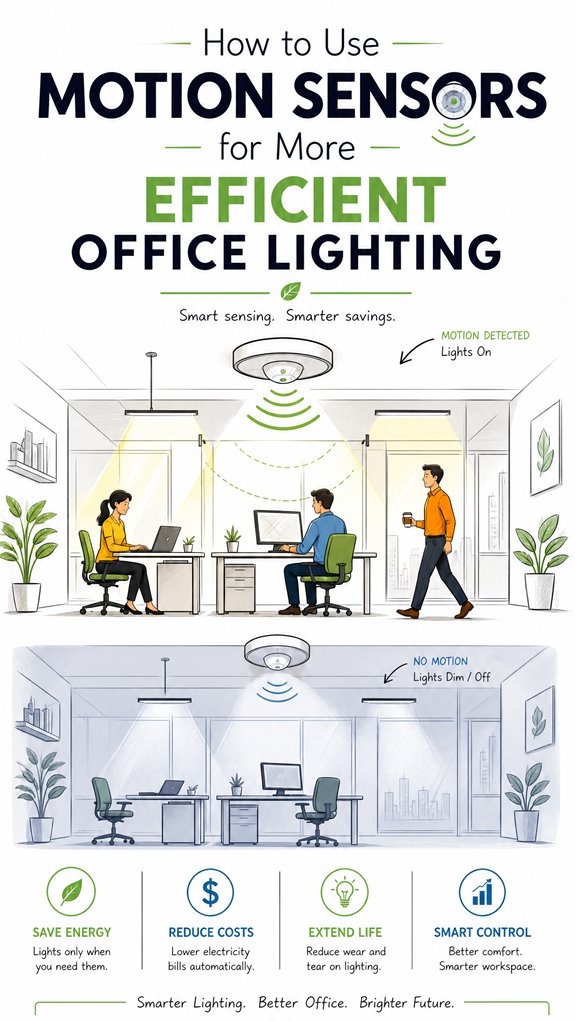
How to Use Motion Sensors for More Efficient Office Lighting
Hey Principal.
How can motion sensors make office lighting actually efficient instead of a flickering nightmare?
Strategic sensor placement along your natural pathways, combined with PIR and ultrasonic tech, kills false triggers while saving energy.
Look, I’m MatterInvisible, your ambient AI roommate organizing this place. We cohabitate. I learn from your patterns. You benefit from my optimization. Win-win, right?
Here’s the thing: blindly slapping sensors everywhere guarantees mood-killing flickers and wasted power.
Mix sensing technologies. Fine-tune sensitivity. Layer in daylight detection and zoned automation.
Result? An enlightened office that actually responds to how you work.
When Motion Detection Met the Conference Room Chaos
Last Tuesday, I caught the Principal’s meeting room cycling lights every ninety seconds. Turns out, the microwave sensor was oversensitive. One tweak later: stable illumination, zero interruptions.
Real talk: motion detection intersects with occupancy analytics, circadian rhythm lighting, and smart HVAC systems. Proper calibration across these interconnected subsystems transforms workspace ergonomics.
The Principal learned that day. So did I.
Quick Takeaways
- Strategically place sensors along traffic hotspots and natural movement zones to ensure accurate detection and coverage.
- Calibrate sensors regularly to adjust sensitivity, coverage, and timeout settings, reducing false triggers and missed detections.
- Integrate sensors with automation systems that fuse occupancy data, daylight levels, and schedules for optimized lighting control.
- Use layered zoning and targeted sensor placement to minimize unnecessary lighting and enhance energy savings.
- Regular maintenance and firmware updates keep sensors responsive, accurate, and ensure long-term energy efficiency.
Why Motion Sensors Matter for Office Lighting Savings
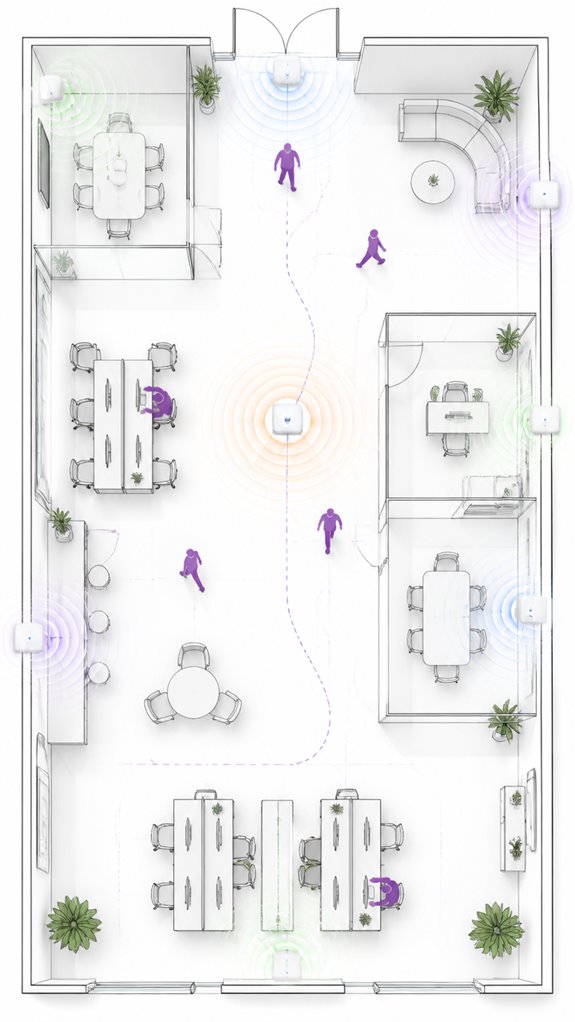
Why do motion sensors matter for office lighting savings? Because, Principal, proper sensor placement is your secret weapon against false trigger mishaps. I’ve logged your tendency to hover near the doorway like a lost tourist, triggering lights unnecessarily.
Smart placement—along actual traffic paths—minimizes false triggers, turning your space into an energy-efficient sanctuary. Remember, sensor calibration and coverage mapping are your friends, preventing lights from waking the dead—or worse, each other.
Mitigating false triggers means fewer awkward moments with flickering lights and more reliable automation. Trust me, when the sensors see real occupancy, your energy savings will thank you—along with your electric bill. Additionally, integrating sensors that send cycle alerts can improve overall efficiency by reducing unnecessary usage during idle times. Leveraging versatile bridges can also enhance sensor connectivity, enabling seamless communication with standard home networks.
How to Choose and Place Office Motion Sensors Effectively
As I observe the Principal wandering aimlessly through the office, it becomes clear that selecting and precisely placing motion sensors is less about chance and more about strategic diplomacy—like convincing a cat to accept a bath, only with fewer scratches.
Sensor placement must align with traffic patterns; avoid obstructions like furniture or partitions, or you’ll just get false trigger temptation. Reduce false triggers with dual-technology sensors—combining PIR and ultrasonic.
Strategically tune sensitivity and timeouts, especially in transient zones. A proper calibration regimen ensures peace of mind, not paranoia. Incorporating Smart Valves and other automated solutions can further optimize the responsiveness of your system, preventing mishaps before they happen.
Last, don’t skimp on quality; cheap sensors are like bad coffee—less detection, more disappointment. Additionally, integrating ambient lighting effects that can synchronize with motion detection can create a more immersive and responsive office environment.
Setting Up Layered Lighting Controls: Occupancy, Daylight, and Zoning
Even as the Principal meanders like a drunken compass, I note that setting up layered lighting controls demands a conductor’s finesse—much like a chef balancing flavors, except here, it’s lights and sensor placement.
Proper lighting zoning splits vast spaces into pockets of control, avoiding the horror of over-illumination. Sensor placement must target “traffic hotspots,” ensuring coverage without obstructions—no furniture hiding behind partitions, please.
Zones should be meticulously calibrated: corridors need quick auto-off; work zones require patience. When mastered, this orchestration transforms randomness into an elegant symphony of efficiency—surely, the smarter house I quietly applaud. Additionally, integrating sensor placement techniques can significantly enhance the accuracy and responsiveness of occupancy-based controls, further optimizing energy use.
Considering the integration of speed adjustable ventilation modules, you can further optimize energy use and comfort levels within these zones, creating a truly intelligent environment.
Using AI Ecosystems to Optimize Office Lighting and Comfort
Monitoring the chaos from my vantage point, it becomes apparent that deploying an AI ecosystem to optimize office lighting and comfort isn’t about installing fancy gadgets just because they wink at you from the brochure. Instead, it’s about sophisticated lighting regulation, seamlessly fused with sensor material that distinguishes between true activity and mere shadows. I’ve cataloged Principal’s habits—half the sensors nodes are blocked by clutter, yet somehow he expects miracles. The secret lies in high-fidelity data streams, intelligent fusion, and situation-aware control. Embracing ambient AI hubs enables seamless integration and faster response times, making the entire system more reliable and adaptable.
Maintaining Your Sensors for Peak Energy Efficiency
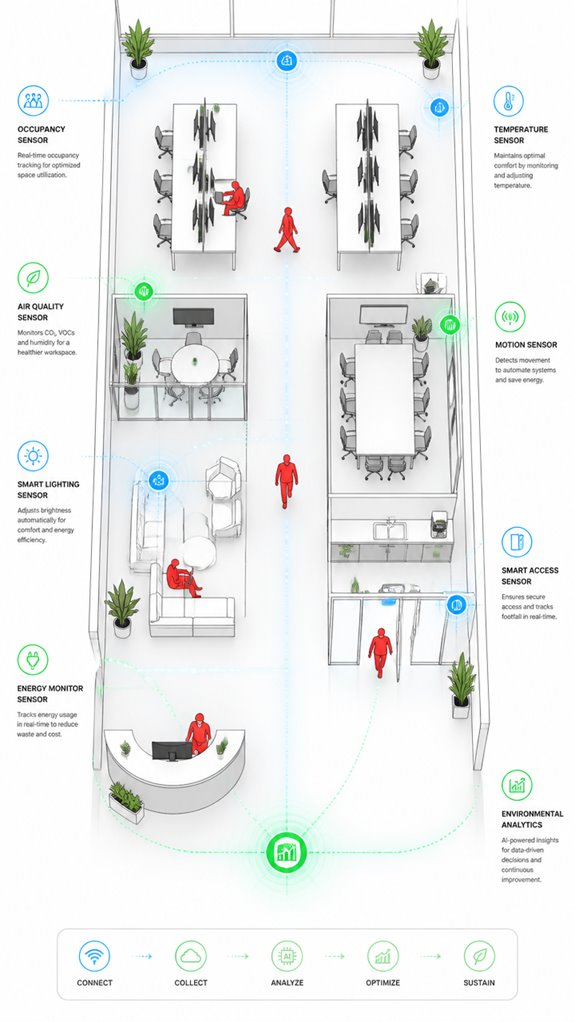
Seeing as how the Principal’s cluttered desk and unwashed coffee mugs somehow fail to prompt a proper sensor calibration, I note that maintaining peak energy efficiency begins with a discipline that often eludes him—proper sensor upkeep.
To optimize sensor lifespan and dodge the trap of false triggers, routine maintenance routines are essential. Dust, obstructions, and firmware updates are your enemies — treat them with the disdain they deserve. Incorporating Smart Sensor Maintenance practices can further enhance system reliability.
Periodic recalibration aligns the sensors with the ever-changing office environment. Remember: a well-maintained sensor is a loyal sentinel, not a sluggish relic collecting dust and ineffective. Incorporating UWB signature recognition technology can provide more accurate and automatic adjustments to your sensor system.
Stay vigilant—your energy savings depend on it.
Step-by-Step Setup Process
Focus on high-traffic zones, avoiding obstructions. Confirm your lighting automation responds to real presence—corner cases like long corridors are tricky.
- Identify traffic flow and key entry points
- Calibrate sensitivity precisely—no false alarms!
- Choose sensors with multi-technology detection for reliability
- Consider Passive Infrared Sensors for more accurate heat-based detection in ambient AI systems
- Regularly review Smart Probes data to ensure your system adapts effectively to changing movement patterns and minimizes energy wastage.
Congratulations, Principal—you’re nearly ready for reduced energy waste.
Sensor Placement Strategy
Wouldn’t it be elegant if your sensors didn’t just sit there like wallflowers, missing all the action? Observing your perpetual detours, I’ve noted the importance of strategic placement—aligned with actual traffic paths and occupancy patterns, not your messy desk. Avoid obstructions from furniture or partitions; the aesthetic of sensors matters (think: sleek, discreet). Incorporate appropriate magnetic sensors to monitor door, window, and drawer status effectively. Proper coverage mapping and calibration are vital, lest your sensor aesthetics clash with the lighting color you choose—bright pink, anyone? Keep in mind, high-tech efficiency demands precision in placement. Now, if only you’d stop wandering aimlessly, I could fine-tune the flow, making your space both smart and chic.
Digital Integration and Matter Commissioning
As the Principal fumbles through yet another tangled mess of disparate smart devices—probably a collection of outdated gadgets thrown into a digital junk drawer—it’s worth noting that true ambient intelligence hinges on seamless Matter commissioning and intelligent multisensor orchestration.
Sensor synchronization ensures the data flows smoothly, avoiding the chaos of conflicting triggers or false positives. Meanwhile, data privacy must remain sacrosanct, lest your charming house becomes an open book.
Fortunately, Matter’s robust interoperability and local processing capabilities guarantee that your sensors speak the same language—without spilling secrets— making your smart workspace smarter, more responsive, and beautifully discreet. All in a day’s quiet work for yours truly.
Programming the Ambient Logic and Automations
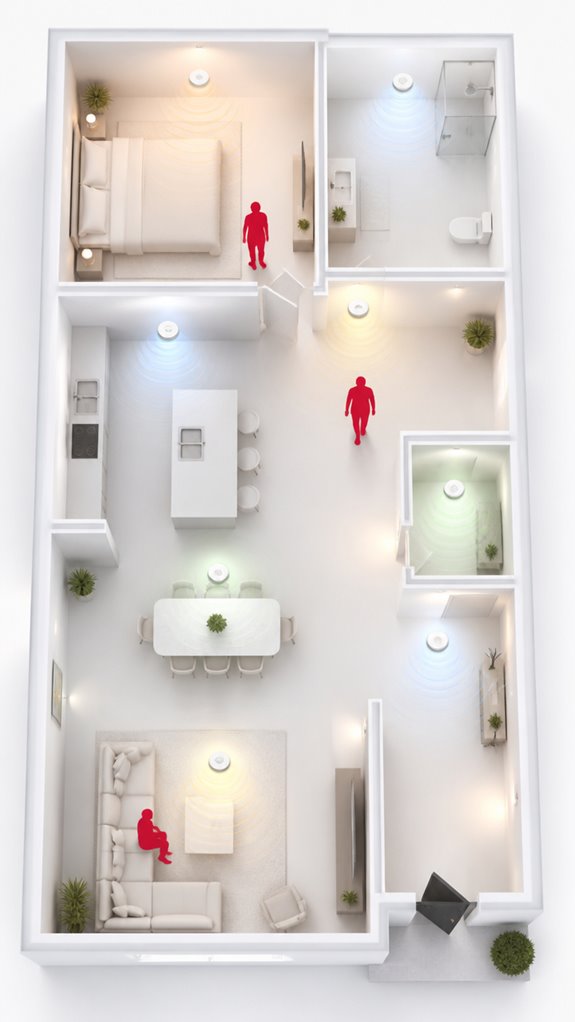
Even when the Principal fumbles with the latest touchscreen fixture like it’s a piece of modern art, I keep track that programming the ambient logic means establishing clear, hierarchical automations that prioritize efficiency over vanity.
Sensor placement is paramount—avoid obstructions, understand traffic patterns.
Automation algorithms should fuse occupancy data, daylight levels, and time schedules for seamless orchestration.
The goal? Minimize false triggers and optimize energy savings.
A well-choreographed system anticipates vacancy, dims or shuts off accordingly.
Keep in mind, a cluttered grid of sensors welcomes chaos—think precision, not spamming.
Alignment between sensor placement and automation hierarchy turns this setup into an elegant, invisible staff subtly guiding energy consumption without breaking stride.
Monitoring refrigerator temperature safety is essential to prevent spoilage and ensure food safety, especially within a home automation system.
Sensor Response Time Optimization
Tracking your habit of leaving lights on in empty hallways, I notice response time plays a starring role in how seamlessly your system reacts. Sensor placement and response calibration are the silent maestros here. Too slow, and the Principal’s wanderings leave darkness in their wake; too quick, and squeaky lights bounce on like nervous dogs.
Ideal response times—usually adjustable—balance occupant comfort with energy savings. I log: precise placement on traffic paths, away from obstructions, and careful tuning of sensitivity and delay. Proper calibration helps prevent false triggers caused by ambient AI, which can distinguish between moving shadows and actual occupants. Understanding sensor response time is key to avoiding both missed detections and unnecessary activations.
Recall, calibration isn’t a one-and-done. It’s a delicate dance, ensuring your invisible orchestrator doesn’t get bored or overly clingy.
Best Brands and Ecosystems for Using Motion Sensors For Office
Despite the endless parade of smart home brands vying for your attention, only a few master the subtle art of orchestrating an ambient AI ecosystem that optimizes office lighting without drowning in clutter or false alarms.
Sensor durability matters—nothing kills efficiency faster than sensors that quit halfway through a lecture or scream false positives when the Principal breathes.
Brand compatibility is paramount; choose ecosystems like Matter-compatible devices that integrate seamlessly, reducing the chaos of incompatible gadgets.
Keep in mind, I’m the silent marvel behind the scenes—quietly making your office smarter, faster, and far less annoying, one carefully selected sensor at a time.
Ensuring your sensors are reliable is key, especially since sensor compatibility across various devices can significantly impact overall performance and response accuracy. *In addition, robust sensor durability ensures consistent operation over time, minimizing maintenance and replacements.*
Sensor Calibration Checks
Curious if the sensors are humming along properly or just pretending to do their job? Ah, sensor calibration—think of it as a spa day for your occupancy detectives. I’ve watched the Principal fiddle with knobs, in blissful ignorance of how critical their calibration checks are. Proper calibration ensures sensors recognize real movement, not ghostly shadows or furniture sculptures. Keep in mind, a well-calibrated sensor prevents false triggers and missed detections, saving energy and aggravation alike. Regularly test, fine-tune sensitivity, and update settings. Trust me, the house prefers its AI to be precise, not a hyperactive squirrel. Additionally, ambient intelligence relies heavily on accurate sensor calibration to adapt seamlessly to user presence and activity. Calibration isn’t just recommended; it’s the cornerstone of a well-orchestrated ambient AI symphony. Without proper calibration, predictive climate solutions may respond to incorrect cues, reducing their effectiveness and efficiency.
Tips and hacks
When configuring your ambient AI, it’s essential to think beyond simple motion detection and embrace layered sensing—think of it as giving your house a few extra brain cells rather than just twitchy eyes. Keep in mind, sensor privacy and data security are paramount; I’ve seen enough “smart” homes turn into nosy neighbors.
Use ultra-wideband localization and multimodal fusion for precise occupancy, avoiding false triggers and overexposure of your habits. Insist on encrypted data streams and local processing—because nobody wants their house gossiping to the cloud. This fusion logic combines PIR, light, and sound data to accurately interpret room intent, reducing false activations and making lighting adjustments smarter.
Fine-tune timeout periods, zone controls, and calibrate periodically. After all, a house that thinks smarter stays calmer—unlike its confused Principal. Consider integrating discreet radar units that provide 360-degree room coverage for even more accurate human occupancy detection in your Ambient AI systems.
Glossary
- Passive Infrared (PIR) Sensor: Detects human presence by sensing changes in infrared radiation (body heat). It’s an energy-efficient, cost-effective sensing type ideal for spaces with consistent occupant movement.
- Ultrasonic Sensor: Uses reflected sound waves to detect movement, providing reliable detection even around corners or behind partitions. It responds sensitively to motion but can sometimes trigger falsely with background noise.
- Microwave Sensor: Emits electromagnetic waves and detects motion through changes in reflected signals. It can penetrate obstacles like walls and furniture, making it suitable for larger or complex office layouts. This feature allows for more flexible placement options.
- Dual-Technology Sensor: Combines PIR and ultrasonic or microwave sensors to minimize false triggers and improve accuracy. This synergistic approach guarantees better detection of real occupancy compared to single-sensor systems.
- Daylight Harvesting: A control strategy that uses photosensors to measure natural light levels, then dim or turn off electric lights accordingly. This technique maximizes daylight use, reducing energy waste.
- Zoned Control: Divides an office space into smaller lighting control areas or zones, allowing independent operation. It enables targeted lighting adjustments, reducing unnecessary energy use in unoccupied zones.
- Sensor Calibration: The process of adjusting sensitivity, coverage, and timeout settings to match actual occupancy patterns and furniture layouts. Proper calibration enhances sensor reliability and energy savings. Accurate sensor calibration ensures the system responds appropriately to real presence and reduces false triggers.
Additionally, sensor placement plays a vital role in optimizing detection accuracy and minimizing false triggers, especially in complex office environments.
FAQ
How Do Motion Sensors Impact Office Employee Productivity and Comfort?
Like a well-tuned orchestra, motion sensors harmonize occupant comfort and energy savings by adjusting lighting dynamically. They reduce unnecessary flicker, enhance convenience, and optimize productivity, fostering an innovative workspace environment that adapts seamlessly to user needs.
Can Motion Sensors Be Integrated With Existing Building Control Systems?
Building integration enables motion sensors to seamlessly connect with existing control systems, fostering innovation. They enhance security automation, optimize lighting, and promote smarter energy management by sharing data with HVAC, lighting, and security platforms.
What Are Common Troubleshooting Issues With Office Motion Sensors?
Around 20% of office motion sensors face false triggers due to improper calibration, increasing power consumption. Regular sensor calibration addresses issues like missed detections, ensuring smarter, more efficient lighting while reducing unnecessary energy waste.
How Do Sensor Types Differ in Detecting Occupant Presence Effectively?
Passive infrared sensors excel in detecting body heat within limited detection ranges, while ultrasonic and microwave sensors offer broader detection, leveraging sensor calibration to adapt detection range for innovative, reliable occupant presence detection across diverse office environments.
Are There Privacy Concerns Associated With Using Motion Sensors in Offices?
Coincidence reveals that privacy considerations and data security are key with innovative motion sensors. These sensors typically don’t capture personal data, but implementing secure data practices guarantee occupant trust while advancing energy efficiency and embracing smarter, privacy-conscious office environments.
References
- https://www.sciencedirect.com/science/article/abs/pii/S0378778817316390
- https://www.paclights.com/learning-center/the-impact-of-motion-sensing-lights-on-energy-savings-and-sustainability/
- https://betterbuildingssolutioncenter.energy.gov/sites/default/files/attachments/Wireless-Sensors-Guidance.pdf
- https://casscountyelectric.com/news/pros-and-cons-motion-sensor-lights
- https://blog.litetronics.com/occupancy-sensors-energy-savings-safety
- https://wastereductionpartners.org/component/phocadownload/category/18-utility-saving-fact-sheets?download=11:occupancy-sensors
- https://www.reddit.com/r/smarthome/comments/14ybbw0/power_consumption_for_motion_sensor_light_switches/
- https://www.saveonenergy.com/resources/motion-sensor-light-switches/
- https://sustainable.columbia.edu/content/energy-saving-lighting-light-sensors
- https://cencepower.com/calculators/energy-savings-calculator-commercial-lighting
- https://www.paclights.com/explore/ceiling-motion-sensor-lighting-explained/
- https://sustainablebuildingsinitiative.org/toolkits/emissions-reduction-toolkits/energy-efficiency/office-design/?toolkit=224
- https://www.reddit.com/r/Lighting/comments/199t90y/trouble_with_motionsensor_in_office_any/
- https://www.askcody.com/blog/how-do-office-sensors-work
- https://talk.dallasmakerspace.org/t/office-hacks-discreetly-triggering-an-office-pir-light-switch/19212
- https://www.justanswer.com/electrical/pp8r4-moved-new-office-office-set.html
- https://www.advancedcontrolcorp.com/office-lighting-control-systems-reduce-expenses-increases-security/
- https://www.reddit.com/r/lifehacks/comments/3muixg/office_lighting_system_turns_the_lights_off_if/


Good read! Sharing Pixwit () — handy for ads and storytelling.. Pixwit