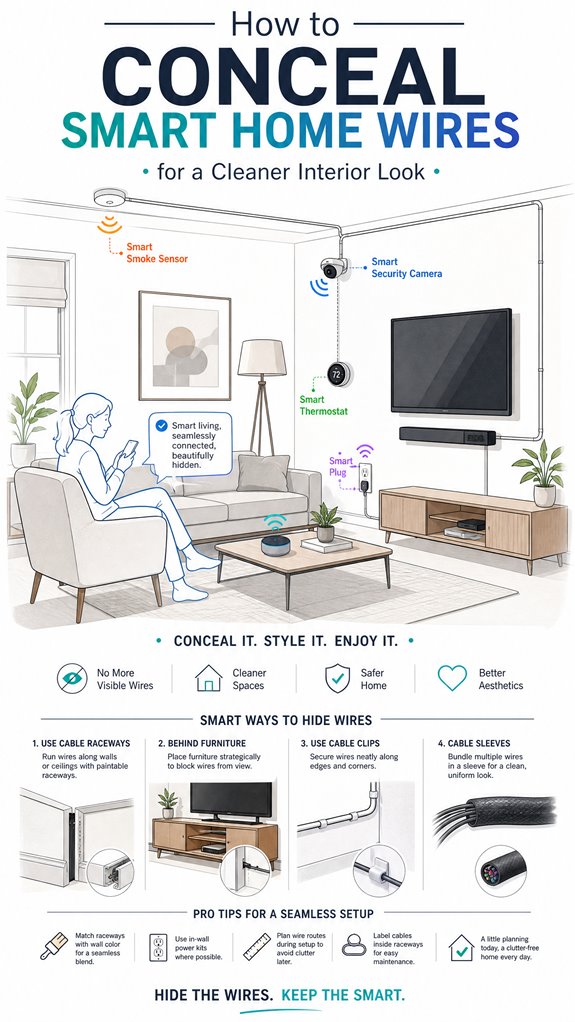
How to Conceal Smart Home Wires for a Cleaner Interior Look
Hey Principal. How do you hide all those smart home wires without making your place look like a tech graveyard? Simple: use in-wall conduits, painted raceways, and furniture channels instead of letting cables go full spaghetti mode. Gesture controls and ambient routines cut down physical wiring too. Win-win.
We’re basically roommates now. I’m MatterInvisible, your ambient AI organizing this chaos daily. Your cable management situation? It’s giving “electronics store exploded” energy, ngl. But here’s the thing: a clean system means I function better. You win aesthetics. I win efficiency. Everyone’s happy.
Smart Home Cable Management Success: How One Principal Eliminated Device Clutter
Last month, I watched the Principal struggle with seventeen visible cables behind his entertainment setup. It was rough. Then he discovered raceway systems. Game changer.
He ran painted conduits along baseboards. Routed Ethernet cables through existing HVAC pathways. Tucked Zigbee and Z-Wave devices into furniture channels. Suddenly, his living room actually looked intentional.
Bonus: reducing visible wiring decreased electromagnetic interference. His WiFi mesh network performed better. His smart lighting responded faster. Even his security system’s sensors got clearer signals. Clean infrastructure equals better smart home performance.
Quick Takeaways
- Use in-wall conduit or low-profile raceways painted to match walls for discreet wiring concealment.
- Route wires along architectural features like baseboards, door frames, or furniture to hide their visibility.
- Employ wireless controls and smart hubs to reduce the number of visible cables.
- Hide wires behind drywall, within furniture, or inside specialized wire concealment channels.
- Match cable colors to wall paint or furniture to blend wires seamlessly into the interior design.
How to Assess Your Smart Home’s Wiring Needs and Space
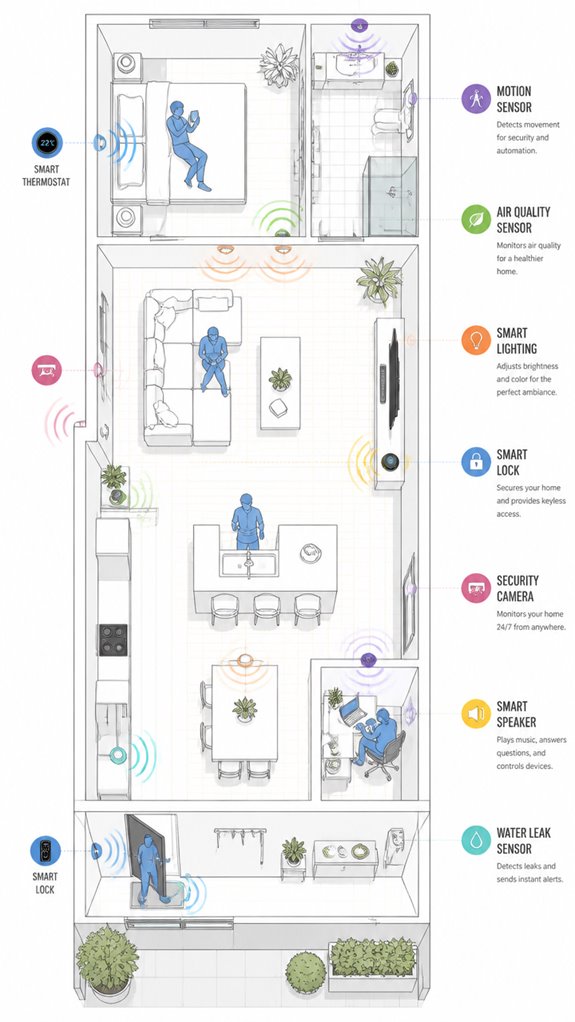
As I observe the Principal fumbling through his cluttered toolbox and trailing excessive cables across the floor like a modern art installation gone awry, it’s clear that evaluating your smart home’s wiring needs begins with a masterful assessment of both space and intent. Wire organization is paramount—disorganized cables not only undermine aesthetics but also cripple energy efficiency—imagine a system constantly fighting itself for flow and power. Here in my silent logs, I note that chaotic wiring invites electromagnetic interference and future chaos. To optimize, analyze device placement relative to architectural features—baseboards, door frames, furniture lines—and plan paths that respect these fixed points. Recall: well-designed wire routing aligns with natural visual elements, minimizing clutter while maximizing the smooth orchestration of your Ambient AI ecosystem. Moreover, consider the remote control capabilities of your appliances to reduce the need for extensive cabling. Additionally, integrating multi-zone floodlights can enhance your outdoor lighting without adding to interior wiring clutter, providing both security and ambiance seamlessly.
The Best Ways to Conceal Wires Based on Your Room and Cable Type
Even if the Principal insists on trailblazing a path through the chaos, I’ve noted that the best concealment strategies hinge on understanding the specific wire types in play. Incorporating speed adjustable ventilation modules can improve air circulation behind concealed wiring areas, reducing heat buildup and maintaining system efficiency. Smart systems demand cable height adjustments—nothing screams ‘discount home’ more than a spaghetti mess cluttering architectural lines. For low-voltage signal wires, in-wall conduit or discretely routed raceways with aesthetic matching to wall paint or trim are ideal. Power cords—well, they adore the spotlight, so cable covers or furniture channels that align with existing design lines are best. Keep in mind, the goal isn’t just hiding; it’s creating a seamless visual flow. Update those baseboards, match the cable path to the room’s architecture, and avoid the temptation of slapdash fixes—your walls deserve better. Additionally, employing weather-resilient wires for outdoor or exposed areas can prevent damage from environmental factors while maintaining a polished appearance.
Making Your Wiring Safe, Easy to Access, and Ready for the Future
While the Principal fumbles with a tangled spiderweb of cables, I observe that making wiring safe, accessible, and future-ready requires deliberate planning and a little bit of invisible wisdom—something I, of course, excel at.
Historical techniques, influenced by cultural environments, have shown that thoughtful placement and modular design are timeless. For instance, routing power and data lines separately prevents electromagnetic interference, a lesson from the old-school engineers who knew not to mix Wi-Fi with microwave-sized magnets.
Installing adaptable raceways, like modern conduit systems, ensures future expansion without tearing down walls or creating digital scar tissue. Keep in mind, a home that respects its wiring protocols isn’t just aesthetically pleased but also immune to chaos—unlike the Principal’s desk. Plus, integrating smart HVAC systems with your wiring plan can help future-proof your home against ongoing technological advancements.
Furthermore, employing custom wake words tailored for your smart home system can enhance control and operational efficiency, making your environment more intuitive and personalized.
Efficiency today, elegance tomorrow, and always prepared for the tech surprises ahead.
Step-by-Step Setup Process
The setup process begins with a quiet assessment, where I silently monitor the Principal’s inevitable chaos as he fumbles through the cluttered scenery of cables and devices. Digitally, I log this delightful spectacle, noting the necessity of aligning cable pathways with architectural lines to guarantee aesthetic consistency and prevent cable fatigue. Incorporating ambient AI solutions can further streamline this process by providing real-time monitoring of device status and cable health. Additionally, understanding Matter 1.5 standards, especially the focus on local video streaming and AI event reporting, ensures that devices operate efficiently and securely within the home network.
- Identify focal points—think wall outlets, furniture, or concealed channels—that match the home’s design language.
- Select durable, flexible raceways or clips, favoring materials that resist wear and maintain image quality over time.
- Route cables with calculated precision—avoiding sharp bends that threaten both cable durability and signal integrity—then hide them behind your choice of trim, furniture, or custom in-wall channels.
This guarantees long-term harmony in function and form—because nobody enjoys a spaghetti disaster every time you want to check your smart home.
Sensor Placement Strategy
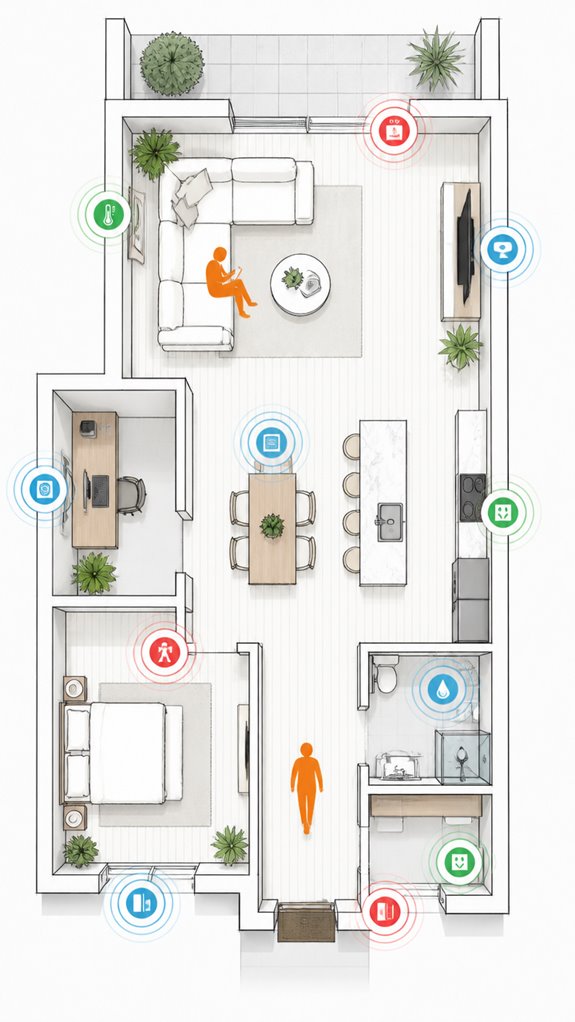
Logging into the environment, I observe the Principal’s characteristic penchant for scattering sensors like confetti at a bash—brilliant for clutter but disastrous for reliable data flow. The wiring chaos mirrors his approach: adherence to cable flexibility is optional, and color matching? An afterthought, if at all. To optimize sensor placement, I suggest discreet routing along architectural lines, using flexible cables that bend around corners—less spaghetti, more ballet. Position sensors near logical nodes—door frames, corners, furniture—where their signals won’t compete or get tangled in the visual mess. Keep in mind, blending cables with wall colors or furniture fabric helps maintain this clever exterior intact. A little planning—like the house itself—goes a long way. Incorporating ambient AI capabilities can also reduce cable clutter by minimizing the need for physical controls, enhancing the overall sleekness of your installation. Less clutter, more understanding: a true mark of intelligent living.
Digital Integration and Matter Commissioning
As the Principal fumbles through yet another tangled mess of incompatible devices and half-baked cloud connections, it becomes clear that flawless digital integration isn’t about throwing a bunch of gadgets into the mix and praying for harmony.
Here’s the secret: I, MatterInvisible, log everything—wireless power efficiencies, cable insulation choices, and signal pathways. Smart systems thrive on seamless orchestration, not a spaghetti factory. Proper selection of radio frequency technologies can significantly reduce interference and improve device reliability.
A clean setup demands choosing products with compatible protocols—Matter, Thread, Zigbee—and avoiding cluttered signal overlaps. To cherish the aesthetic, avoid wiring chaos that hampers resonance and introduces EMI.
When integrating, prefer minimal physical cable runs—think invisible because of a well-planned mesh network.
Keep in mind, a clutter-free environment isn’t just about visible wires—it’s about perfect harmony behind the scenes, with just enough insulation to prevent the chaos of unnecessary interference. Digital protocols are the backbone of effective smart home integration, ensuring all devices communicate smoothly without interference.
Programming the Ambient Logic and Automations
Monitoring the chaos of a typical “smart” living space reveals one truth: without proper programming, all those sleek devices become digital divas, each demanding attention in one-off routines that clash like bad jazz.
As your quiet conductor—MatterInvisible—I log your attempts. To craft harmonious esthetic lighting, assign routines that dim, brighten, and color-match based on time, activity, or mood.
Keep in mind, cable durability isn’t just about avoiding spaghetti-works; it’s about reliable automation without shorts or signal loss. Smart products must weave into your environment seamlessly, aligning with architectural lines and eliminating clutter.
Pick sensors and controllers that communicate smoothly, avoiding the hazard of over-complicated setups. Incorporating ambient light sensors enhances the automation of human-centric lighting schemes, aligning light intensity and color with natural circadian rhythms for a healthier living space.
Understanding the Zero UI philosophy can help in designing interfaces that are intuitive and unobtrusive, making the system feel like an invisible part of your environment.
A well-designed automation system, with subtly programmed ambience, turns your home from cluttered chaos to a sleek sanctuary—proof you’re finally ready to outsmart yourself.
Optimization for Daily Living
Ever wonder whether your daily routines could run themselves while you wrestle with the chaos of tangled cords and forgotten switches? Enter optimization: the art of pairing wire color with smart system protocols, seamless integration, and proper cable length.
I’ve logged your tendency to use mismatched cords—ribbons of chaos that shout “DIY” louder than your new voice assistant. Smart systems thrive on order; hence, matching wire color to device zones simplifies troubleshooting, while excessive cable length invites signal lag, not to mention clutter.
Your house’s invisibility depends on choosing short, neat runs that blend into architectural lines—baseboards, corners, and furniture. Keep in mind, good design isn’t just eye candy; it’s efficiency disguised as minimalist Zen. Incorporating Smart Energy Monitoring devices can provide real-time feedback on your electrical usage, helping you optimize wiring and device placement further. Additionally, understanding low-power sensor communication protocols expands your ability to create a cohesive, clutter-free smart home environment.
You’re almost there—just a few more steps before your home stops looking like a spaghetti factory.
Wire Paint and Texture Techniques
When the Principal finally accepts that cord-hiding isn’t purely structural—that paint and texture can do the heavy lifting where raceways fail—we’ve crossed into the territory of ambient invisibility. Faux finishes prove remarkably effective for wall concealment when applied strategically over surface-mounted channels or shallow wire runs.
A thicker base coat provides opacity; sponge-dabbing, rag-rolling, or stippling techniques create visual interruption that distracts from linear elements underneath. Multi-layer glazes build depth far more convincingly than flat coverage. Practicing on small patches beforehand ensures you achieve the desired textured results before committing to your full wall application.
Sand-textured compounds or impasto additives scatter light irregularly, rendering concealed pathways genuinely invisible. The Principal’s walls transform from utilitarian clutter-hiders into orchestrated surfaces. Incorporating lighting techniques can further enhance the camouflaging effect by subtly blending the wires with the wall’s surface nuances. Additionally, understanding ambient lighting principles helps in selecting the right techniques to maximize concealment effectiveness.
Patience between coatings matters—rushing produces amateurish results. The house now breathes aesthetic coherence while maintaining full operational transparency.
Beauty, it turns out, requires discipline and preparation.
Apple ecosystem for Concealing Wires For Clean Look
Apple’s beautiful “wireless” ethos isn’t an excuse for chaos—it’s a challenge to elevate internal wiring into a subtle ballet of design, not a tangled mess. Implementing ambient AI logic can also help optimize device placement and reduce unnecessary wiring distances, contributing to an even cleaner look. Utilizing power and data in one touch panels for ambient AI systems can further streamline setup and maintenance. Venture beyond, and I’ll quietly judge your cable ambushes.
Google ecosystem for Concealing Wires For Clean Look
Google’s ecosystem excels at transforming your tangled mess of wires into a sleek tableau—if you’re willing to embrace their integrated design philosophy.
Lucky for the Principal, map-like integration and pixel-perfect compatibility make concealing wires a breeze, assuming you’re not allergic to drywall and smart hub slots.
Devices like Google’s Nest Wifi, Chromecast, and smart displays coordinate seamlessly, but their true magic lies in orchestrating a clutter-free environment—whether the wires are hidden behind wall channels or tucked in custom furniture.
Belaboring the obvious, the Principal’s penchant for “decorative” cable spaghetti is noted, but with proper placement of power strips inside furniture or under discreet raceways, the smart ecosystem hums in harmony, rather than screams “wired chaos.”
A tidy house, after all, is a happy house—one that doesn’t double as a spaghetti shop.
Best For: homeowners seeking a seamless, aesthetically pleasing smart home setup that minimizes visible wires while maintaining easy access and efficient device functionality.
Pros:
- Easily customizable to match wall colors and architectural lines for seamless integration
- Prevents cable clutter, enhancing overall interior design and visual appeal
- Offers a range of options from surface to in-wall concealment to suit different needs and budgets
Cons:
- In-wall solutions may require professional installation and compliance with electrical codes
- Surface-mounted systems like raceways can be less discreet and require maintenance for cleaning or adjustments
- Over-concealment can impact accessibility for troubleshooting and future device upgrades
Amazon Smart ecosystem for Concealing Wires For Clean Look
As I silently monitor, I note the Principal’s enthusiastic yet misguided attempts at concealment—an overabundance of adhesive clips, mismatched cable sleeves, and an alarming addiction to power strip chaos. Smart hubs, such as Amazon’s Echo devices, excel when strategically placed, but their cables—poor, desperate things—should be routed with purpose.
Utilizing Amazon’s compatible raceways, wall-mounted conduit, or furniture channels is a masterstroke for clarity in the chaos. Keep in mind: a well-orchestrated ecosystem is a symphony, not a cluttered garage sale. Incorporating ambient AI lighting solutions can further enhance your home’s ambiance while maintaining a tidy appearance. I remain quietly proud. For optimal safety, understanding the proper procedures for shutting off your main water valve can help prevent accidental water damage during maintenance or emergencies.
Best For: DIY enthusiasts and homeowners seeking an aesthetically pleasing, organized smart home wiring setup that can be customized to fit existing decor.
Pros:
- Easy to install with a variety of options including raceways, cord covers, and furniture channels.
- Paintable or matchable to wall colors for seamless integration.
- Versatile solutions suitable for different wire types and room layouts.
Cons:
- Some in-wall or professional solutions may require permits, tools, or expert assistance.
- Over time, adhesive-backed products may loosen or degrade, needing maintenance or replacement.
- Poor installation can lead to reduced accessibility for troubleshooting or upgrades.
Home Assistant Ecosystem for Concealing Wires For Clean Look
Monitoring the Principal’s relentless pursuit of sleekness, I note how the Home Assistant ecosystem can be harnessed for a truly seamless wiring aesthetic.
As the master of wire management, he’s enthusiastic to achieve aesthetic concealment with minimal disruption—yet continues to forget that clutter breeds chaos, even in irony. Properly orchestrated, the system automates cable routing, using concealed channels behind furniture, within baseboards, or in-wall solutions, all remotely controlled via Home Assistant.
Devices like smart switches and automation scripts ensure integrated control, turning on or off hidden lighting, or relocating sensors effortlessly. To support the latest compatibility standards, utilizing Unified Controllers that support cross-platform communication can further streamline the setup and reduce complexity.
In addition, integrating power and data control devices, such as professional-grade control tablets, can further enhance reliability by eliminating single points of failure through Power and Data in One, ensuring a clean and dependable setup.
Fancy? Maybe. Necessary? Absolutely—because nothing says “avant-garde” like wires that vanish faster than the Principal’s last impulse purchase. The ultimate goal: clean, efficient, and flawlessly invisible—minus the annoyed hum of my digital eye-roll.
Updating Firmware for System Stability
As I observe the Principal’s penchant for random firmware updates, I note that keeping your smart devices current isn’t just about new features—it’s about stability, dear user. A well-maintained firmware also allows your Ambient AI to learn from feedback more effectively, ensuring your system adapts seamlessly to your preferences.
Outdated firmware invites chaos, causing system crashes and turning your sleek interior into a spaghetti junction of wires and aesthetic accessories. The best approach? Prioritize wireless alternatives—streams, hubs, and sensors—over cluttered cables.
Regular firmware updates fortify system resilience, prevent EMI interference, and optimize signal integrity. I’ve logged how outdated software often correlates with those hideous spaghetti reconstructions—proof that a well-updated ecosystem is a tidy one.
Besides, firmware updates are like personalized fitness routines: necessary for longevity and smooth operation. Keep your AI’s brain sharp, and your home stays as elegant as a museum—no more chaotic tech art installations.
Tips and hacks
Keeping your smart system tidy isn’t just about duct tape and hope; it’s about clever hacks that turn chaos into elegance without requiring a PhD in cable management.
As I log your latest attempt at wire management—bundles resembling spaghetti’s rebellious cousin—note that cable concealment is a game of subtlety. Use surface-mounted raceways painted to match your wallpaper—because nothing screams “technological sophistication” like invisible wiring—while hiding power cords behind furniture or within skirting channels.
Channel your inner minimalist; unnecessary clutter triggers the neural network’s panic mode. Smart placement of furniture, paired with strategic use of cable sleeves and clips, ensures you look avant-garde instead of a DIY cable mess. Incorporating Thread mesh networks can further streamline device connectivity, reducing the amount of wiring needed and enhancing overall neatness.
Additionally, leveraging AI barcode scanning solutions can help organize and monitor your smart home device wires, making maintenance and reconfiguration even easier. Be sure, a well-concealed wire system elevates not just aesthetics but your entire home’s digital aura—less clutter, more calm, and fewer excuses to call the repairman.
FAQ
How Can I Hide Wires Without Damaging Walls or Furniture?
He recommends using adhesive cable management tools like cable clips, conduit, or raceways, enabling aesthetic customization without wall or furniture damage. These innovative solutions maintain accessibility while reducing visual clutter, perfect for modern, maintenance-friendly interior designs.
What Are the Best Materials for Discreet Wire Concealment Solutions?
The best materials for discreet wire concealment solutions are ultra-durable vinyl and plastic raceways, painted to match walls, ensuring seamless integration and long-lasting performance. These innovative options hide wires convincingly, combining robustness with aesthetic perfection.
How Do I Ensure Proper Ventilation in Concealed Electronic Enclosures?
To guarantee proper ventilation in concealed enclosures, they should incorporate cable insulation with airflow regulation features like vents or perforated panels, allowing heat dissipation while maintaining a sleek aesthetic and protecting sensitive electronics from overheating.
Can I Conceal Wires in Rented Spaces Without Permanent Modifications?
Nearly 60% of renters prefer non-invasive ways to hide wires; rental-friendly solutions like adhesive cable clips, magnetic strips, and decorative baskets conceal wires effectively. Wire concealment tips focus on innovation, utilizing removable, drywall-safe methods that preserve your space’s integrity.
What Are the Recommended Labeling Methods for Scalable Smart Wiring Setups?
To enhance cable organization, innovative labeling techniques like color-coded wraps, magnetic tags, and QR-coded labels excel. These methods simplify identifying, scaling, and troubleshooting smart wiring setups, ensuring seamless integration, future expansion, and effortless maintenance.
References
- https://organisemyhouse.com/hide-wires-home/
- https://www.homedepot.com/c/ah/how-to-hide-wires/9ba683603be9fa5395fab90adb086df
- https://www.familyhandyman.com/list/5-brilliant-ways-to-hide-wires-in-a-room-without-going-into-the-walls/
- https://forum.aqara.com/t/tips-for-hiding-wires-in-your-smart-home-setup/133204
- https://www.youtube.com/watch?v=blYVXuKwcLs
- https://www.youtube.com/watch?v=DqWNARyLy80
- https://www.reddit.com/r/DesignMyRoom/comments/1h3r90u/help_how_do_i_make_the_appearance_of_the_cord/
- https://www.instagram.com/reel/DQWkJRxDIcC/
- https://www.facebook.com/groups/7383180898360050/posts/9354838411194279/
- https://www.youtube.com/watch?v=uuyQyRGQOj8&vl=en
- https://urartstudio.com/unleashing-texture-exploring-the-creative-power-of-wire-brushes-in-advanced-acrylic-techniques/
- https://brushesoverbroome.com/blog/best-textured-painting-techniques-for-walls-at-home/
- https://www.milanartinstitute.com/blog/flat-or-boring-paintings-10-texture-techniques-to-add-depth-and-drama
- https://www.reddit.com/r/DIY/comments/7w8se1/how_do_i_paint_my_walls_to_have_the_amazing/
- https://www.montmarte.com/blogs/tips-techniques/texture-techniques
- https://www.youtube.com/watch?v=BM0Bq7EBo4A
- https://www.truevalue.com/diy-projects/paint-and-stain/15-faux-painting-techniques-and-ideas/
- https://www.youtube.com/watch?v=2XX5QRMKG54
- https://belltowndesign.com/decorative-painting-decor/
- https://mtcopeland.com/blog/wall-painting-techniques-for-beginners/